
Window
A floating window: a title bar you can drag, a content area that scrolls, and a
fixed area above and below it. It has no buttons and no logic of its own - that
is what Dialog adds.
Window w = new Window("The album");         // Modal, not resizable, as large as its content
add(w);                                     // Added to the page, not to the content panel
w.add(new Para().add("Anything added to the window lands in its content area."));
Making one
The constructors differ only in how much they set:
| Constructor | What it gives |
|---|---|
Window() |
a modal, non-resizable window without a title |
Window(String title) |
...with a title |
Window(boolean resizable, String title) |
...and a say in resizing |
Window(boolean modal, boolean resizable, String title) |
...and in modality |
Window(int width, int height, String title) |
a modal, resizable window of that size |
Window(boolean modal, boolean resizable, int width, int height, String title) |
all of it |
The same things can be said after the fact, and those calls chain:
title(String), title(IBundleCode, Object...), modal(), modal(boolean),
resizable(), size(int, int), width(int).
A size is optional. Without one the window is as wide and as high as its
content; with one it is exactly that size and the content scrolls inside it. A
height of -1 in the five-argument constructor means "no height given". The
minimum that may be set is 250 wide by 100 high; anything smaller throws.
The parts of it
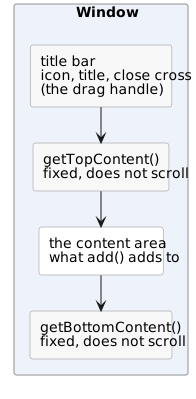
add() on the window adds to the content area - the window delegates to it -
so building the inside of a window is no different from building a page.
| Method | What it does |
|---|---|
getTopContent() / getBottomContent() |
the two areas that stay put while the content scrolls |
setClosable(boolean) |
whether the title bar has a close cross (default: it has) |
setIcon(IIconRef) / getIcon() |
an icon in front of the title: a font icon, an svg or an image |
setIcon(String) |
the same by resource url (THEME/... for an image from the current theme) |
setWindowTitle(String) |
change the title of a window that is already up |
The height of a top or bottom area must be set before anything is put in
it (getBottomContent().setHeight("40px")). The layout of the window is
computed from those two heights, and without them the content area does not
know where it ends.
Closing it
| Call | What happens |
|---|---|
close() |
the window disappears, and the close handler is not called |
closePressed() |
the window disappears and the close handler is called with RSN_CLOSE ("closed") |
| the close cross | exactly closePressed() |
| a click next to a modal window | the same again, unless setAutoClose(false) |
w.setOnClose(reason -> {
	//-- reason is "closed" here; a Dialog also sends "save"
});
So close() is what code uses when it decided the window is done, and
closePressed() is the user's cancel. A subclass can override
onClosed(String reason) instead of setting a handler.
What it does not have
A Window has no buttons, does not validate anything and does not know what
saving is. When the window is a form the user must fill in and confirm, the
component to use is Dialog; for a sentence and a couple
of buttons it is MsgBox2.
A window is an error fence, so messages raised inside it are shown inside it rather than on the page behind it.