
Images, icons and file upload
Pictures, in the three roles they play in an application. An icon is the small thing that marks a button or a row, and it is not a component: it is a reference that components ask for a node. An image is a picture that is part of the screen. And an upload is a file the user hands to the server - usually, but not always, a picture.
- The components
- An icon is a reference, not a component
- Size and colour are css classes
- A picture is not an icon
The components
Icons - one reference type, three kinds of node:
| Component | What it is for |
|---|---|
IIconRef, Icon and Theme |
how an icon is referred to, and the two sets the framework ships |
FontIcon |
a glyph from an icon font: text, so it takes the colour of text |
SvgIcon |
an svg file inlined in the page, and recolourable |
ImgIcon |
a small img tag, for icons that are really pictures |
...and the pictures:
| Component | What it is for |
|---|---|
Img |
the plain html image tag |
DisplayImage |
shows a stored image, resized, without sending it with the page |
ImageSelectControl |
the same, but the user can replace it |
FileUpload2 |
one file, uploaded the moment it is chosen |
FileUploadMultiple |
the same, for any number of files |
An icon is a reference, not a component
This is the thing to understand before anything else here. A DomUI component
lives at exactly one place in the page's node tree, so the same icon component
cannot mark two buttons. What components accept is therefore an
IIconRef - a description of an icon, from which a node is
made whenever one is needed:
IIconRef save = Icon.faSave;                       // A reference: reusable

new DefaultButton("Save", save, () -> save());      // ...used here
bar.addButton("Save this too", save, () -> save()); // ...and here
cp.add(save.createNode());                         // ...and here as a node of its own
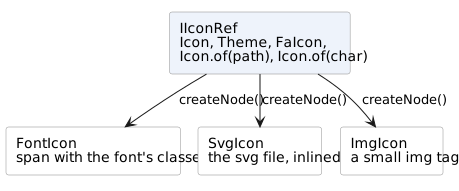
Which of the three it makes is the reference's business, not yours: an
Icon.of("x.svg") makes an SvgIcon, an Icon.of("x.png") an ImgIcon, and an
entry of a font pack's enum a FontIcon. Code that accepts an IIconRef works
with all of them.
Size and colour are css classes
css(...) on a reference returns a new reference carrying those classes, so
the same icon can be large in one place and small in another:
cp.add(Icon.faTrash.css("is-size-2", "is-danger").createNode());
| Classes | What they do |
|---|---|
is-size-1 … is-size-7 |
the size, 1 being the largest |
is-size-small, is-size-normal, is-size-medium, is-size-large |
the same by name |
is-primary, is-link, is-info, is-success, is-warning, is-danger, is-white, is-black, is-light, is-dark |
the colour, from the theme's palette |
Colour works on a font icon and on a single-colour svg. It cannot work on an image icon - a png is a picture, and css does not repaint it. That is the practical reason to prefer a font or an svg icon for anything that has to follow the theme.
A picture is not an icon
The other half of this group is about actual pictures, and the difference between them is where the bytes are.
Img is the html tag: it points at a resource - something in
the web application, in the theme, or beside a class in a jar - and the browser
fetches it. Nothing about it is dynamic.
DisplayImage and
ImageSelectControl show an IUIImage: a picture
the application has, in a database or a file, at whatever size it happens to
be. They render an img tag pointing back at themselves and serve the picture,
resized to the size asked for, from a second request - so the page stays small
and the resizing happens once.
Those two need ImageMagick installed on the server: it is what identifies an uploaded file and resizes it. The upload components below do not - they hand over the file untouched.