
Tables, lists and trees
Showing more than one record at a time. Everything in this group works the same way: a model says what the rows are, a renderer says what one row looks like, and a component puts them on the screen.
The components
| Component | Shows |
|---|---|
DataTable<T> |
rows in a table, a page at a time |
DataPager |
the bar that walks a table through its pages |
RowRenderer<T> |
what a row looks like: the columns and everything about them |
| the table models | where the rows come from - a query, a list, your own |
ExpandingEditTable<T> |
a small table that opens one row at a time for editing |
DataCellTable<T> |
the same rows as a grid of cells rather than lines |
ListShuttle |
two lists with values moving between them |
Tree3<T> |
a tree, over a tree model |
The three parts
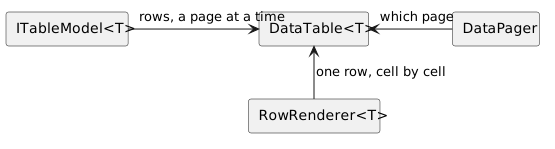
None of the three knows what the others do. The model can be a database query or a list you built; the renderer does not care which; the table asks the model for the rows of one page and hands each of them to the renderer. That is what lets a screen swap its query without touching its columns, and its columns without touching its query.
The rule that follows from it is worth stating once: every change to the data
goes through the model. model.add(), model.delete(), model.modified() -
those are what tell the table which rows to redraw. A list changed behind the
model's back leaves the screen showing what was there before.
Binding
The cells of a table are not text: they are controls bound to the row objects, which is why changing an object changes the screen without the table being told anything. That has enough special cases of its own - renderer-built cells, editable cells, rows arriving from an observable list, and what a rebuilt row costs - to have its own section on the DataTable page.
Which one to use
| You want | Use |
|---|---|
| a screen full of records, paged | DataTable + DataPager |
| a handful of records, all edited together | ExpandingEditTable |
| items as tiles rather than lines | DataCellTable |
| to pick some values out of a list, in order | ListShuttle |
| records that contain records | Tree3 |
Where to start
The walkthrough page showing rows builds a list screen from nothing and explains the model, the renderer and the pager as it goes. The pages here are the reference: everything a column can be told, every model that ships, and what selection does.