
Navigation and menus
Getting somewhere else, and choosing what to do. The components in this group are the visible handles on two things the framework does underneath: the page stack, which remembers where the user came from, and the action, which knows its own name, icon and whether it may be done at all.
The components
Where you are, and how you get somewhere else:
| Component | What it is for |
|---|---|
BreadCrumb2 |
the path that led here, as steps you can click |
ALink |
a link to another page of the application |
...and the two menus:
| Component | What it is for |
|---|---|
PopupMenu2 |
a small menu that opens at a component and closes when it is done |
HamburgerMenu |
the list of actions behind a three-bar button |
Moving is not this group's job
None of these decides what a move does. Whether the page you leave is shelved,
replaced or thrown away is the MoveMode of the move, and what happens to the
page object, its fields and its conversation is described once, in the
walkthrough under
page navigation.
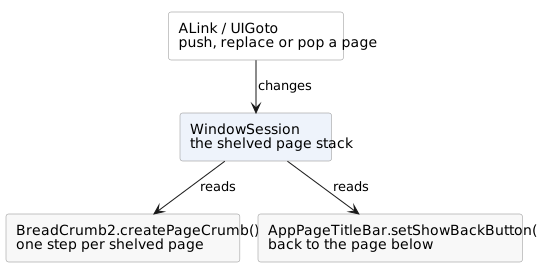
An ALink and a UIGoto make the same move; the link is the one you can click,
right-click and open in a new window. A BreadCrumb2 made with
createPageCrumb() is that same page stack, drawn.
A menu is made of actions
Both menus take their entries from
IUIAction: the name, the tooltip, the
icon and the reason the entry cannot be used right now all come from the action
rather than from the menu. That is why the same operation can sit on a button, in
a popup menu and behind a hamburger without being described three times.
PopupMenu2 can also be filled by hand, item by item, when there is nothing to
reuse. HamburgerMenu cannot: it is a list of actions and nothing else.
Neither menu is a component you keep. Both are built when the button is pressed, put on the page, and removed again the moment something is chosen or the mouse goes elsewhere. Do not hold on to one, and do not put one in a field.