
Dialog
A Window with a button bar and the handling that belongs
to a save button: check the input, move it to the model, save, close.
Dialog dlg = new Dialog(true, false, 460, -1, "Order \"Big Ones\"") {
	@Override protected void createFrame() throws Exception {
		super.createFrame();
		createButtons();                          // A Dialog does not make its buttons by itself
	}

	@Override public void createContent() throws Exception {
		FormBuilder fb = new FormBuilder(this);
		fb.label("Copies").control(copies);
	}

	@Override protected boolean onValidate() throws Exception {
		Integer value = copies.getValueSafe();    // Empty: the control reports that itself
		if(null == value) {
			return false;                         // Refused: the dialog stays open
		}
		return true;
	}

	@Override protected boolean onSave() throws Exception {
		order(copies.getValue());
		return true;
	}
};
dlg.setButtonsOnBottom(true);                     // Before the bar exists, or it throws
add(dlg);
The buttons
getButtonBar() returns the bar - a ButtonBar2,
behind the IButtonBar interface - and creates it in the top area the first
time it is asked for. setButtonsOnBottom(true) puts it in the bottom area
instead, and has to be called before anything else touches the bar - afterwards
it throws IllegalStateException.
What is on the bar is up to the dialog:
createButtons()makes the usual pair: a save button (labelled with the application's "okay" text) and a cancel button. Nothing calls it for you - the dialog above does it fromcreateFrame(), which is where a subclass is expected to do it.getButtonBar().addButton(...)adds buttons of your own, exactly as on any other button bar. A dialog that never callscreateButtons()has only these.
| Method | What it is for |
|---|---|
createButtons() |
the default pair; override to make a different set |
createSaveButton() / createSaveButton(String, IIconRef) |
the save button, with a text and icon of your own |
createCancelButton() / createCancelButton(String) / createCancelButton(String, IIconRef) |
the same for cancel |
noIcons() / noIcons(boolean) |
this dialog's buttons carry no icons |
Dialog.setAllNoIcons(boolean) |
...the same for every dialog in the application |
The two buttons carry the test ids saveButton and cancelButton.
What the save button does
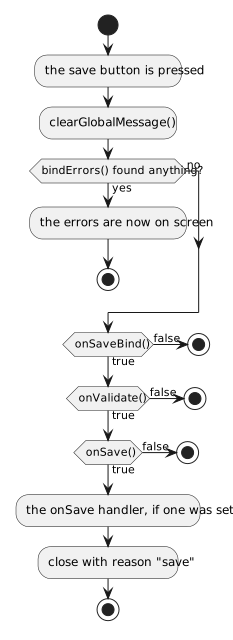
Every step that returns false leaves the dialog standing, which is how it
refuses to be closed. The three that are meant to be overridden divide the work:
| Method | What belongs in it |
|---|---|
onSaveBind() |
move what the controls hold into the model |
onValidate() |
decide whether that model is acceptable |
onSave() |
do the actual saving |
setOnSave(IExecute) |
...or, for a dialog you do not subclass, one handler run after all three succeeded |
onCloseException(Exception) |
return true to swallow an exception thrown while closing; the dialog stays open |
A dialog that refuses has to say why: post a message on the control
(setMessage), on the dialog (addGlobalMessage) or in a box
(MsgBox2.on(this).error(...)) before returning false. The dialog is an error
fence, so the first two are shown inside it.
How it closed
| Reason | When |
|---|---|
Dialog.RSN_SAVE ("save") |
the save button, and all four steps agreed |
FloatingDiv.RSN_CLOSE ("closed") |
the cancel button, the close cross, or a click next to a modal dialog |
dlg.setOnClose(reason -> {
	if(!Dialog.RSN_SAVE.equals(reason)) {
		//-- Cancelled.
	}
});
For a dialog that asks for one single value there is a subclass that writes all
of this for you: InputDialog.