
Drag and drop
Drag and drop is not a component: it is two handlers you hang on nodes you already have. A node with a drag handler can be picked up, a node with a drop handler can receive one, and a type name decides which may land where.
Div pet = new Div("pet");
pet.setDragHandler(dragHandler);            // This can be picked up

Div basket = new Div("basket");
basket.setDropHandler(dropHandler);         // Things can be dropped here
- The two handlers
- Nothing is moved for you
- Which nodes can do this
- Two kinds of drop zone
- What the browser shows
The two handlers
IDragHandler says what the dragged thing is, and gets a chance to react
once it has landed:
IDragHandler handler = new IDragHandler() {
    @Override public String getTypeName(NodeBase source) {
        return "pet";                       // What this is, for the drop zones
    }

    @Override public IDragArea getDragArea() {
        return null;                        // The node itself is the handle
    }

    @Override public void onDropped(DropEvent event) throws Exception {
        event.getDraggedNode().remove();    // Take it out of where it was, if you want that
    }
};
IDropHandler says what a zone accepts, and does the actual work when
something lands:
IDropHandler drop = new IDropHandler() {
    @Override public String[] getAcceptableTypes() {
        return new String[]{"pet"};         // Only these types can be dropped here
    }

    @Override public void onDropped(DropEvent event) throws Exception {
        basket.add(event.getDraggedNode()); // Adding it to the new parent moves it
    }
};
A zone that does not accept the type of the thing being dragged does not light
up and cannot be dropped on, so the type names are the whole permission system.
Two directions need two names: in the demo above a pet in the shop is a
shop-pet and the basket accepts that, a pet in the basket is a basket-pet and
the shop accepts that, and the drop handler swaps the drag handler over as it
moves the node.
Nothing is moved for you
The framework decides that a drop happened and where; what it means is up to the handlers:
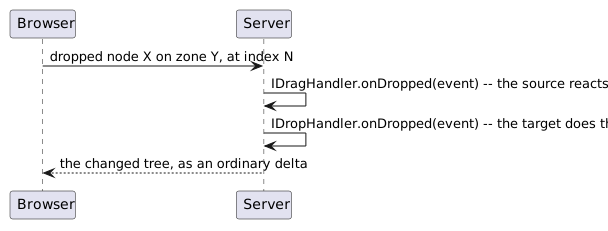
The drag handler runs first, then the drop handler. Adding the dragged node somewhere else is what moves it - a node can only have one parent, so adding it takes it out of the old place. A drop handler that builds something new instead (a table row around the dragged node, say) usually pairs with a drag handler that removes the original.
Which nodes can do this
| Node | Can be dragged | Can be a drop zone |
|---|---|---|
Div |
yes | yes |
TR |
yes | no - the TBody is where rows land |
Any component built on a Div is therefore draggable, including your own: put
the handler on the component and the whole thing moves.
Two kinds of drop zone
A zone is in one of two modes, and the mode decides what the browser shows while something hovers over it and what the drop handler is told.
DIV mode: the zone as a whole
The default. The whole zone lights up while an acceptable thing hovers over it,
and the position inside the zone means nothing: the drop handler decides where
the node ends up. setDropHandler() alone gives you this.
ROW mode: a position in a table
A zone is in ROW mode when it is given a TBody to drop into:
Div zone = new Div();
Table table = new Table();
zone.add(table);
TBody body = table.getBody();

zone.setDropHandler(dropHandler);
zone.setDropBody(body, DropMode.ROW);       // Rows land in this body
The browser now shows an insert marker between the rows, following the mouse, and the drop handler is told where it landed:
@Override public void onDropped(DropEvent event) throws Exception {
    TR row = new TR();
    row.addCell().add(nameOf(event.getDraggedNode()));
    body.add(Math.min(event.getIndex(), body.getChildCount()), row);
}
DropEvent.getIndex() is the row number to insert at, getColIndex() the column
the mouse was over. The TBody must be inside the Div that carries the drop
handler; it does not have to be a direct child.
A row that is dragged inside the same table is removed by its own drag handler before the drop handler runs, so the number of rows has already changed by then. Clamp the index to the number of rows that are left, the way the example above does.
What the browser shows
| Css class | On what |
|---|---|
ui-drgbl |
every node with a drag handler; the theme gives it the move cursor |
ui-drpbl |
every node with a drop handler |
ui-drp-hover |
a DIV-mode zone while an acceptable thing hovers over it |
ui-drp-ins |
the cell of the placeholder row marking the insert position in ROW mode |
The drop zones are measured when a drag starts, so a zone that moved or changed size since the last drag is still found correctly.