
Lookup and search
The controls in the choice group show every value there is and let the user pick one. These do the opposite: the user says what they are looking for, and the control goes and finds it. That is what a table of twenty thousand customers needs.
The components
| Component | What it is for |
|---|---|
LookupInput2<T> |
one record as the value of a form field: type a few letters, or search in a dialog. |
SearchInput2 |
the search box itself - what LookupInput2 types in, usable on its own. |
SearchAsYouType<T> |
a value typed rather than picked, matched against a list held in memory. |
SearchPanel<T> |
a whole search screen: a form of search fields that produces a QCriteria. |
Two different jobs
Finding one record to put in a field is LookupInput2. It is a control like
any other: it has a value, it can be mandatory, it can be bound. The customer on
an invoice, the album a track belongs to.
Searching for the records a screen is about is SearchPanel. It is not a
control and has no value: it is a form of search fields, and what it produces is
a QCriteria for the page to run. The list screen of invoices, the search page
of tracks.
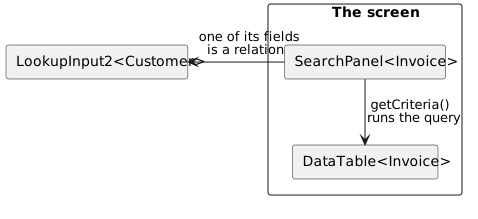
They meet in one place: a SearchPanel field for a relation is a
LookupInput2, because searching for the invoices of a customer means finding
that customer first.
What they have in common
All of them search a table, and none of them ask the user to know a key. Three things follow from that, and they work the same way in each:
Where the search fields come from. Every one of these controls asks the
metadata of the class what may be searched on. A property is marked with
@MetaSearch (or @MetaSearchItem on the class) and gets a search type:
| Search type | Used for |
|---|---|
SEARCH_FIELD |
a field on a SearchPanel form - the default |
KEYWORD |
the quick search of a LookupInput2 |
BOTH |
both of those |
What a search value is. A search control's value is not a value of the
property: it is what the user is allowed to express about it. A number search
holds >= 5, a date search holds a period. That is why the types turn up in the
API as NumberLookupValue and DatePeriod.
Where the query comes from. A control produces a value; an
ILookupQueryBuilder turns that value into restrictions on a QCriteria. The
two are separate on purpose, so either can be replaced without the other.
Reading order
Start at LookupInput2: it is the control most screens
use, and the quick search rules described there are the same ones a
SearchPanel uses for a relation field.