
ALink
A link to another page of the application. It is a real hyperlink and a click handler, which is why the browser's own "open in a new tab" works on it while an ordinary click stays inside the window the user is in.
ALink link = new ALink(AlbumEditPage.class, new PageParameters("albumId", album.getId()));
link.setText("Edit this album");
cp.add(link);
- Where it goes
- Why it is a link and not a button
- A window of its own, on purpose
- What it looks like
- The plain tag
Where it goes
| Constructor | Where it points |
|---|---|
ALink(Class<? extends UrlPage>) |
that page, as a SUB move |
ALink(Class, IPageParameters) |
...with parameters for it |
ALink(Class, MoveMode) |
...and a say in what the move does |
ALink(Class, IPageParameters, MoveMode) |
all three |
ALink(String url, IPageParameters, WindowParameters) |
some other url, not a DomUI page |
setTargetClass(Class, Object...) and setTargetParameters(PageParameters)
change where an existing link points; the href is recomputed when they do.
Without a MoveMode the move is SUB: the page the user is on is shelved and
the new one is opened on top of it, so the back arrow and the breadcrumb lead
back to it. REPLACE, NEW and the rest are the same modes UIGoto uses, and
what each does to the page stack is described in the walkthrough under
page navigation.
Why it is a link and not a button
An ALink renders an a tag with both an href and an onclick handler:
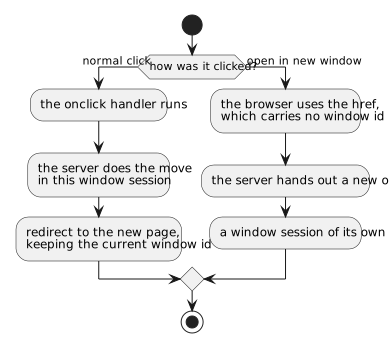
That is the whole point of the component. The page stack, the conversations and
the state of a window session belong to one browser window, and a link opened in
a second window must not join the first one's session. A plain
button calling UIGoto cannot be
opened in a new window at all.
A window of its own, on purpose
link.setNewWindowParameters(WindowParameters.createFixed(500, 400, "detail"));
With window parameters set, clicking the link opens a browser window of that size
and starts a new window session in it - what the right-click route does by
accident, done deliberately. WindowParameters also says whether the window is
resizable and which of the browser's own bars it shows.
What it looks like
| Method | What it does |
|---|---|
setText(String) |
the text of the link |
add(NodeBase) |
...or build its content, an icon in front of the text for instance |
setImage(String url) / setImage(Class, String name) |
a background image of at most 16x16 in front of the text |
The link is written under .ui-alnk, and .ui-alnk-i when it has an image.
The plain tag
ATag is the html anchor ALink is built on, and is the right component when
the target is not a page of this application:
ATag external = new ATag();
external.setHref("https://www.domui.org/");
external.setTarget("_blank");
external.add("The DomUI site");
Give an ATag a setClicked() handler instead and it is a button that looks
like a link - though for that, a
LinkButton says what it is.