
Showing rows
A query returns many rows, and a screen has to show them. In DomUI that is three objects working together: a model that has the rows, a RowRenderer that says what a row looks like, and a DataTable that puts them on the screen.
They are separate on purpose. The model knows nothing about columns, the renderer knows nothing about where rows come from, and the table only asks the two of them for what it needs.
- Your first table
- Defining the columns
- A search screen
- SimpleSearchModel and page navigation
- Non database models for tables
Your first table
//-- 1. The model: the question, and the thing that will run it.
QCriteria<Track> q = QCriteria.create(Track.class);
SimpleSearchModel<Track> model = new SimpleSearchModel<>(this, q);

//-- 2. The renderer: which columns, in which order.
RowRenderer<Track> rr = new RowRenderer<>(Track.class);
rr.column(Track_.name()).label("Track").ascending().sortdefault();
rr.column(Track_.album().title()).label("Album");
rr.column(Track_.unitPrice()).label("Price");

//-- 3. The table itself, plus a pager to walk through the result.
DataTable<Track> dt = new DataTable<>(model, rr);
cp.add(dt);
dt.setPageSize(10);
cp.add(new DataPager(dt));
Sort by clicking a header, and walk through the pages at the bottom. The query is not run when the model is made: it runs the first time the table needs rows, which is when it is rendered.
SimpleSearchModel takes the QCriteria from
using databases and the node it should get its
QDataContext from - this, the page, so it uses the page's shared context.
setPageSize(10) is what makes the table a paged one; without it every row it
got is shown at once. The pager is a separate component you place where you want
it - above the table, below it, or both - and it also reports the number of
records, with a marker next to it when the model hit its maximum. That maximum is
1000 rows by default and is what keeps a careless query from pulling a whole
table into memory; model.setMaxRowCount() changes it.
Defining the columns
Every column() call adds a ColumnDef, and everything you want to say about
that column you say by chaining onto it:
//-- A label of your own, a width in characters, and the column sorted on initially.
rr.column(Track_.name()).label("Track").width(30).ascending().sortdefault()
	.cellClicked(t -> {
		clicked.removeAllChildren();
		clicked.add("Cell clicked: " + t.getName());
	});

//-- A converter decides how the value is shown.
rr.column(Track_.milliseconds()).label("Duration").converter(new MsDurationConverter()).align(TextAlign.RIGHT);

//-- A property of a property: the column follows the relation.
rr.column(Track_.album().title()).label("Album").width(25);

//-- A renderer gets the column's value and fills the cell itself.
rr.column(Track_.unitPrice()).label("Price").align(TextAlign.RIGHT)
	.renderer((node, price) -> {
		Span s = new Span(price.toString());
		node.add(s);
		if(price.compareTo(BigDecimal.ONE) >= 0)
			s.setCssClass("dm-tut-hi");
	});

//-- A column that is the whole row. It has no property, so say what it sorts on.
rr.column().label("Where it is from").maxWidth(40).sort(Track_.album().artist().name())
	.renderer((node, track) -> node.add(track.getAlbum().getTitle() + " by " + track.getAlbum().getArtist().getName()));

rr.setRowClicked(t -> {
	clicked.removeAllChildren();
	clicked.add("Row clicked: " + t.getName());
});
Click a track name and then anywhere else in a row: the name column has a cell handler of its own, the rest of the row has the row handler. Sort on Where it is from and the rows come back ordered by artist, even though that column has no property at all. The price of 1.99 is highlighted by its renderer, and the last column is capped at 40 characters wide - what does not fit is cut off, with the whole text as a hover title.
Which column
| Call | The column shows |
|---|---|
column(Track_.name()) |
a typed property, checked by the compiler |
column(Track_.album().title()) |
a property across a relation |
column("album.title") |
the same, by name |
column(BigDecimal.class, "unitPrice") |
by name, with the type stated |
column() |
the row object itself - give it a renderer |
What the column can be told
| Method | What it does |
|---|---|
label("Track") |
the header text |
width(30) |
the width in characters |
width("20%") |
the width as css |
maxWidth(40) |
cap the width; longer content is cut and gets a hover title |
align(TextAlign.RIGHT) |
the text alignment of the cells |
css("...") / cssHeader("...") |
a css class on the cells / on the header |
nowrap() / wrap() |
whether the cell content may wrap |
hint("...") |
a tooltip on the column header |
converter(...) |
how the value is turned into text |
renderer(...) |
fill the cell yourself |
ascending() / descending() |
make it sortable, and in which direction first |
sortdefault() |
the column the table is sorted on when it first appears |
sort(Track_.album().title()) |
what to sort on when the column has no property |
sortable(SortableType.UNSORTABLE) |
switch sorting off for this column |
cellClicked(handler) |
a click handler for this column's cells |
editable() / factory(...) |
put a control in the cell instead of text |
What a cell actually is
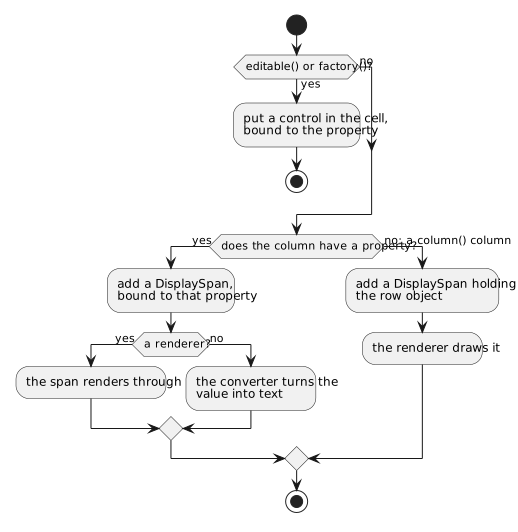
A cell is not a piece of text, it is a DisplaySpan bound to the property of
the row object - the same data binding as anywhere
else. Change a value on a row object that is on screen and the cell follows,
without the table being rebuilt.
A renderer is an IRenderInto<V>: it is handed the cell to fill and the value to
show - the column's value, or the whole row for a column() column. Two things
about it are worth knowing:
- it is not called for a null value, so an empty cell needs no handling. If you
do want to show something for null, implement
renderOpt()instead of writing a lambda. - it replaces the text, not the binding: the cell is still bound, and still re-renders when the value changes.
A column is either yours or the framework's. Combining editable() or
factory() with renderer() or converter() throws: an editable cell holds a
control, and a control does its own conversion and rendering, so do the
editing inside your renderer or leave the cell to the framework.
Sorting
A column is sortable because you said which way it sorts first:
rr.column(Track_.name()).label("Track").ascending().sortdefault();
rr.column(Track_.milliseconds()).label("Duration").descending();
rr.column(Track_.composer()).label("Composer").sortable(SortableType.UNSORTABLE);
ascending() and descending() make the header clickable and decide which
direction the first click gives; clicking the column that is already sorted
turns it around. sortdefault() picks the one column the table starts out
sorted on. A column() column has no property to sort on, so it needs
sort(...) to name one.
The header click does not reorder what is on screen. It tells the model to
sort - sortOn(property, descending) - and then asks it for rows again. Where
that sorting happens is up to the model, and for SimpleSearchModel it happens
in the database: the property becomes an order by on the query, next to the
row limit.
That is the important part, because the two are applied in this order:

Sort, then limit, then show - not limit, then sort. Sorting 20,000 tracks by name in a model that fetches 1000 rows gives you the first 1000 names of all tracks, and clicking the header again gives you the last ones. If it were the other way round you would be sorting an arbitrary thousand rows, and the answer on screen would be wrong in a way nobody notices.
The price is a query per sort: every header click throws the result away and asks the database again.
A search screen
A list of everything is rarely what a user wants. SearchPanel<T> is the other
half of a list page: it shows a form, and turns what was filled in into a
QCriteria - the exact thing the model wants.
SearchPanel<Track> sp = new SearchPanel<>(Track.class, "name", "album.title", "album.artist.name");
cp.add(sp);

//-- One more field, added by hand.
sp.add().property(Track_.unitPrice()).label("Price").control();

Div results = new Div();
cp.add(results);

sp.setClicked(() -> {
	QCriteria<Track> criteria = sp.getCriteria();
	if(null == criteria)                            // Bad input: the errors are on the screen already.
		return;
	results.removeAllChildren();

	SimpleSearchModel<Track> model = new SimpleSearchModel<>(this, criteria);
	RowRenderer<Track> rr = new RowRenderer<>(Track.class);
	rr.column(Track_.name()).label("Track").ascending().sortdefault();
	rr.column(Track_.milliseconds()).label("Duration").converter(new MsDurationConverter());
	rr.column(Track_.album().title()).label("Album");
	rr.column(Track_.album().artist().name()).label("Artist");

	DataTable<Track> dt = new DataTable<>(model, rr);
	results.add(dt);
	dt.setPageSize(10);
	results.add(new DataPager(dt));
});
Type love in Title and press Search.
The whole screen is in that one handler: ask the panel for the criteria, make a
model from it, make a table, put both in a Div that was empty until now. The
Div and the table are local variables the handler closes over - there is no
need to keep either of them in a field, and no need to rebuild the page, which
would throw away what the user typed.
In this example the setClicked() handler recreates everything: every click it will recreate a DataTable, RowRenderer and Model. While this works fine it can be done simpler: create the data table and renderer inside the main code, and make the setClicked handler only create a new SimpleSearchModel and assign that to the existing table. This will force it to redraw itself.
getCriteria() returns null when one of the fields contains something that
cannot be searched with; the messages are already on the screen by then, so the
handler just returns. When nothing at all was filled in it returns a criteria
without restrictions - a search for everything.
Where the fields come from
new SearchPanel<>(Track.class, "name", "album.title")      // these properties, in this order
new SearchPanel<>(baseCriteria)                            // ...on top of a query you fix yourself
The names are the properties to search on, in the order they are given, and a
name may walk a relation like album.artist.name. The QCriteria form starts
from a query of your own, so the user searches within a set you decide - a base
filter they cannot get out of.
For a field the panel would not have made itself, add() gives you a builder:
sp.add().property(Track_.unitPrice()).label("Price").control();
control() with no argument picks the control for the property's type, the way
the constructor does; control(myControl) uses one you made, and
defaultValue(), initialValue(), minLength() and ignoreCase() are on the
same builder.
For each field the panel also knows how that type is searched, and the user can say more in the box than a plain value:
| In a text field | Finds |
|---|---|
love |
everything starting with "love", case insensitive |
*love* |
everything containing "love" - * is the wildcard |
love. |
exactly "love" - a trailing point means no wildcard |
| In a number field | Finds |
|---|---|
0.99 |
exactly that value |
> 200, <= 10, != 3 |
a comparison |
> 12 < 100 |
a range |
* / ! |
any value / no value at all |
The rest of the panel is the buttons: Search is what setClicked() handles,
Reset empties the fields, Hide collapses the panel once a result is on
screen. setOnNew() adds a "new" button for creating a record, setOnClear()
hooks the reset, and setCollapsed() decides how the panel starts out.
SimpleSearchModel and page navigation
A list where clicking a row opens a detail page has a problem the framework solves for you. While the user is in the detail page - editing, saving - the list page is shelved: alive, with the rows it read before. Coming back to a screen full of stale data would be worse than useless.
So this happens instead:
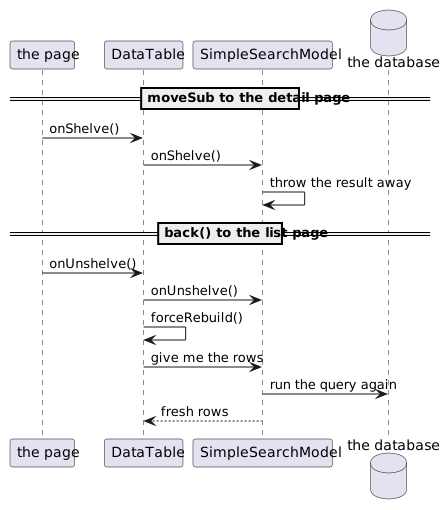
The counter on that page is incremented inside the query itself. Click a row to open a track, press Back, and it says the query has run twice. Page through the result and it stays where it is - the model read the whole result once, and the pager only slices it. Sort on a column and it goes up: a different order is a different query.
The mechanism is small. A DataTable is a node like any other, so it is told
when its page is shelved; it passes that on to its model if the model implements
IShelvedListener. SimpleSearchModel does, and all its onShelve() does is
drop the result it is holding. On the way back the table rebuilds itself, asks
for rows, and a model with no result runs its query. A model of your own gets the
same behaviour by implementing that one interface.
There is a second staleness underneath it, one query cannot fix. The list page still has the persistence session it read those rows with, and a session hands back the entity objects it already knows rather than overwriting them with what the new query read. For that:
model.setRefreshAfterShelve(true);
With this on, the model calls refresh() on the row objects it hands to the
table, so their values come from the database rather than from what the session
remembered. It costs a read per row shown, which is why it is not the default.
Non database models for tables
Not every table comes from a query. SortableListModel<T> puts one over a list
you have: rows you built, computed, or read from somewhere that is not a
database.
/** The state of this page: the basket itself. */
private final List<BasketLine> m_basket = new ArrayList<>(List.of(
	new BasketLine("Kind of Blue", 1, new BigDecimal("12.50"))
	, new BasketLine("Abbey Road", 2, new BigDecimal("14.95"))
	, new BasketLine("The Wall", 1, new BigDecimal("19.95"))
));

@Override
public void createContent() throws Exception {
	...
	SortableListModel<BasketLine> model = new SortableListModel<>(BasketLine.class, m_basket);

	RowRenderer<BasketLine> rr = new RowRenderer<>(BasketLine.class);
	rr.column(BasketLine_.title()).label("Album").width(30).ascending().sortdefault();
	rr.column(BasketLine_.copies()).label("Copies");
	rr.column(BasketLine_.price()).label("Price each").converter(new MoneyBigDecimalNoSign());

	DataTable<BasketLine> dt = new DataTable<>(model, rr);
	cp.add(dt);
	...
}
The table is built exactly as before - the model is the only thing that changed. There is no query, so a header click sorts the list itself, in memory, with a comparator for the property that was clicked, and the row limit of the previous sections plays no part.
SimpleListModel<T> is the same thing without the sorting; SortableListModel
adds it, and needs the class of the rows to build its comparators from.
Changing the rows
bb.addButton("Add a line", () -> model.add(new BasketLine("New album " + (++m_added), 1, new BigDecimal("9.95"))));
bb.addButton("One more copy of the first line", () -> {
	BasketLine line = model.getItem(0);
	line.setCopies(line.getCopies() + 1);
	model.modified(0);                            // Tell the model, or the screen keeps the old number.
});
bb.addButton("Delete the first line", () -> {
	if(model.getRows() > 0)
		model.delete(0);
});
Press the buttons: rows appear, disappear and change, and nothing on that page
calls forceRebuild(). The model tells the table exactly what happened and the
table changes those rows and nothing else - one row added, one row gone, one cell
different.
Every change goes through the model: add(), delete(), modified() and
move(). Change the list behind its back, or change a field of a row object
without saying modified(), and the model has nothing to tell the table -
the screen keeps showing what it showed before.
Adding to a sorted model puts the row where the sort order says it belongs; that
is also why add(index, row) and move() refuse to work while a sort order is
active - the order is not yours to choose then.