
IIconRef, Icon and Theme
An icon is referred to, not constructed. IIconRef is that reference, and the
two enums the framework ships - Icon and Theme - are the standard sets of
them.
new DefaultButton("Save", Icon.faSave, () -> save());
- The interface
- Where a reference comes from
- Icon: the generic set
- Theme: what the framework's own components use
- Adding a font pack of your own
The interface
public interface IIconRef {
    NodeBase createNode();                     // The icon as a node, here and now
    NodeBase createNode(String cssClasses);    // ...with these classes on it
    String getClasses();                       // The classes this reference carries
    IIconRef css(String... classes);           // A new reference, with those added
}
createNode() is what a component calls when it builds itself; application code
calls it only when it wants the icon as a node of its own
(cp.add(Icon.faHome.createNode())).
css() returns a new reference and leaves the original alone, so the enum
constants stay what they are however often they are decorated:
IIconRef warning = Icon.faExclamationTriangle.css("is-size-2", "is-warning");
Where a reference comes from
| Source | What it gives |
|---|---|
Icon.<name> |
one of the generic set, drawn by whichever font pack the application includes |
Theme.<name> |
one of the icons the framework's own components use, from the current theme |
FaIcon.<name> |
any icon of the font pack itself - the full set, not just the generic one |
Icon.of(String path) |
a file: .svg becomes an SvgIcon, .png/.jpg/.gif an ImgIcon, a bare name a FontIcon |
Icon.of(char c) |
a single character, in a span of its own |
An application with icons of its own is best off putting them in an enum that
implements IIconRef, exactly as Icon and Theme do. Every icon the
application uses is then in one file, spelling mistakes do not compile, and
changing an icon everywhere is one line.
Icon: the generic set
Icon names a standard set of icons, and does not say what draws them. It is
a map from the constant to a real reference, and a font pack fills that map in
when the application starts:
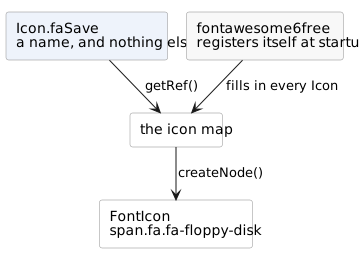
Include one of fontawesome4, fontawesome5free or fontawesome6free - one,
not several - as a dependency and there is nothing else to do: the module
registers an application initializer that adds its stylesheet to every page and
fills the map. Include none and the first icon used throws, saying so.
Because it is a map, any constant can be pointed at something else:
Icon.setIcon(Icon.faSave, Icon.of("img/our-own-save.svg"));
Icon.updateIconMap(manyAtOnce);
The replacement need not be a font icon; an svg or an image is fine. The mapping is global to the application, not per page.
Theme: what the framework's own components use
Theme is the second set: the icons MsgBox2, DataPager, LookupInput2 and
the rest draw themselves with. They are images from the current theme's
directory (THEME/btnSave.png and friends), and Theme.update(...) repoints one
the same way Icon.setIcon does.
The two sets have different jobs: Icon is for your screens, Theme is for
the framework's components. Restyling the framework means updating Theme;
picking an icon for your own button means Icon or the font pack's own enum.
Adding a font pack of your own
The fontawesome* modules are the worked examples, and they are small:
- an enum implementing
IFontIconRef, one constant per icon, whosegetCssClassName()is the font's css class; - an
IApplicationInitializer, registered throughMETA-INF/services, which adds the font's stylesheet as a header contributor and fills theIconmap; - the font and css files themselves, under
META-INF/resourcesso the servlet container serves them.
Each module also carries IconFromCss, which reads a font's css file and writes
the enum - worth copying rather than typing several thousand constants.