
Data binding
A screen that edits something spends most of its code moving values: out of the thing being edited and into the controls, and back again afterwards. Data binding is DomUI doing that for you. You say once which control belongs to which property, and from then on the two follow each other.
What that buys is more than saved typing. The screen stops being the place the data lives: the model is, and your logic only ever touches the model. Logic written that way needs no browser to test.
- Carrying the values by hand
- The same screen, bound
- When the moving happens
- Two kinds of binding
- When the input does not convert
- Binding a style
- The control side is one property, never a path
- Where to go from here
Carrying the values by hand
public class BindByHandPage extends UrlPage {
	private final AlbumOrder m_order = new AlbumOrder();

	@Override
	public void createContent() throws Exception {
		...
		Text2<String> customer = new Text2<>(String.class);
		ComboLookup2<Genre> genre = new ComboLookup2<>(genreList);
		DateInput2 delivery = new DateInput2();
		Text2<Integer> copies = new Text2<>(Integer.class);
		Text2<BigDecimal> price = new Text2<>(BigDecimal.class);

		//-- Every control has to be filled from the model, one call per control.
		customer.setValue(m_order.getCustomerName());
		genre.setValue(m_order.getGenre());
		delivery.setValue(m_order.getDeliveryDate());
		copies.setValue(m_order.getCopies());
		price.setValue(m_order.getPrice());

		...
		cp.add(new DefaultButton("Save", () -> {
			//-- ...and every one of them has to be carried back again.
			m_order.setCustomerName(customer.getValue());
			m_order.setGenre(genre.getValue());
			m_order.setDeliveryDate(delivery.getValue());
			m_order.setCopies(copies.getValue());
			m_order.setPrice(price.getValue());
			showOrder(state);
		}));
	}
}
Five controls, ten lines of carrying, and the two halves have to be kept in step with each other for as long as the screen lives. Add a field and you write two more lines in two different places; forget one of them and the screen quietly loses a value. Worse, the model is only right for the instant just after Save: anything the page wants to do with the order has to remember to copy the controls in first.
The same screen, bound
customer.bind().to(m_order, AlbumOrder_.customerName());
genre.bind().to(m_order, AlbumOrder_.genre());
delivery.bind().to(m_order, AlbumOrder_.deliveryDate());
copies.bind().to(m_order, AlbumOrder_.copies());
price.bind().to(m_order, AlbumOrder_.price());
The ten lines of carrying are gone and no Save button is needed to move anything. The bottom half of that screen is the same five properties again, as read-only controls bound to the same model - type in a field, leave it, and the mirror below follows.
AlbumOrder is a plain class with @GenerateProperties on it, so its
typed properties exist just like an entity's.
Binding by string works too, but a binding is exactly the kind of thing you want
the compiler to check: bind().to(m_order, AlbumOrder_.copies()) on a
Text2<Integer> is right by construction, where "copys" is a runtime surprise.
Now press Clear the price:
cp.add(new DefaultButton("Clear the price", () -> m_order.setPrice(BigDecimal.ZERO)));
The handler touches the model and nothing else - it does not know a price control exists - and both price fields on the screen change. That is the point of the whole mechanism: your logic talks to the model, and the screen is a view of it.
One line per field: using FormBuilder
The mirror at the bottom of that page does not create its controls at all:
FormBuilder fb2 = new FormBuilder(cp);
fb2.property(m_order, AlbumOrder_.customerName()).readOnly().control();
fb2.property(m_order, AlbumOrder_.genre()).readOnly().control();
fb2.property(m_order, AlbumOrder_.deliveryDate()).readOnly().control();
fb2.property(m_order, AlbumOrder_.copies()).readOnly().control();
fb2.property(m_order, AlbumOrder_.price()).readOnly().control();
property() takes the model and the property, and from the property's type it
picks a control, labels it and binds it. Genre is an entity, so it gets a
lookup; Date gets a DateInput2; BigDecimal gets a Text2<BigDecimal>. The
labels come from a AlbumOrder.properties bundle next to the class - without it
you would be reading customerName on screen.
When the moving happens
DomUI uses what it calls soft binding: nothing observes the model, and no setter notifies anybody. A binding is an object stored inside the control, and it is asked to do its work at exactly two moments in a request.
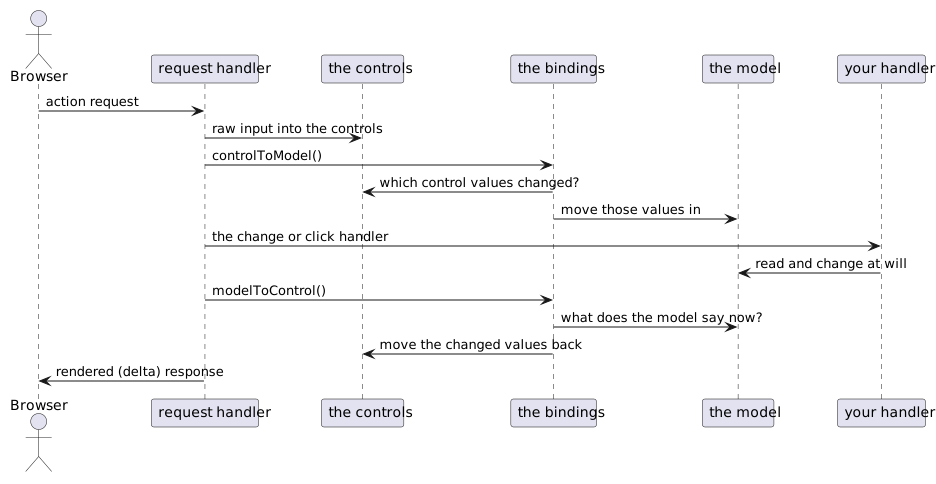
In between those two moves the model is nobody's business but yours. Whatever your handler does to it - including the things it does indirectly, in a setter that changes another property - is picked up by the second move, on the way out.
Because the binding lives in the control, it is alive exactly as long as the control is part of the page. A node that is removed stops binding; add it back and it binds again. There is nothing to unregister and nothing to leak.
This is also why a control is never kept in a field. forceRebuild() builds a
new tree with new controls carrying new bindings; a control left over in a
field is off the page, and its bindings are inert.
Two kinds of binding
bind() with no argument means the value of this control, and that binding is
bidirectional: control to model when a request comes in, model to control on
the way out. It has to be, because the value is the one thing both sides have an
opinion about.
Every other property of a control binds one way only: model to control.
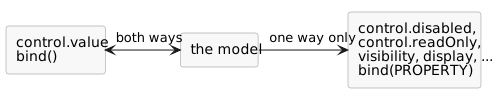
Here is what that is for. A button that may only be pressed once both choices have been made:
public class SendInfoModel {
	private Artist m_artist;
	private Customer m_customer;
	...
	/** There is nothing to send until both choices have been made. */
	public boolean isSendDisabled() {
		return m_artist == null || m_customer == null;
	}
}
artistC.bind().to(m_model, SendInfoModel_.artist());
customerC.bind().to(m_model, SendInfoModel_.customer());
artistC.immediate();
customerC.immediate();

DefaultButton send = new DefaultButton("Send info", () -> ...);
cp.add(send);

//-- The model decides whether the button may be pressed; the button follows.
send.bind(IControl.DISABLED).to(m_model, SendInfoModel_.sendDisabled());
Pick an artist and the button stays off; pick a customer as well and it comes on.
Nothing in the page checks anything: isSendDisabled() is the only place the rule
is written, and it is in a class that mentions no component at all - which is what
makes it something a JUnit test can drive.
The control property to bind to is named by passing it to bind(), and it is a
typed property like any other. The ones you will want are constants on the
interfaces that define them:
| Constant | Property |
|---|---|
IControl.DISABLED |
disabled - the control is off |
IControl.READONLY |
readOnly - the value shows but cannot be changed |
CssBase.VISIBILITY |
visibility - the node is there but invisible |
CssBase.DISPLAY |
display - the node takes no space |
When the input does not convert
cp.add(new DefaultButton("Save", () -> {
	if(bindErrors()) {                        // Anything wrong anywhere below this node?
		return;                               // Yes: it is on screen now, stop here.
	}
	result.removeAllChildren();
	result.add("Saved: " + m_order.getCopies() + " copies for " + m_order.getCustomerName() ...);
}));
Put abc in Copies and press Save. The field goes red, the message says the
content is invalid, and nothing is saved. Fix it and Save works. Leave Customer
empty and it is the same story with "Mandatory field".
The interesting part is what happened before Save. When the request came in, the binding asked the control for its value, the conversion failed - and the binding kept quiet about it. It stored the error in itself and left the model alone.
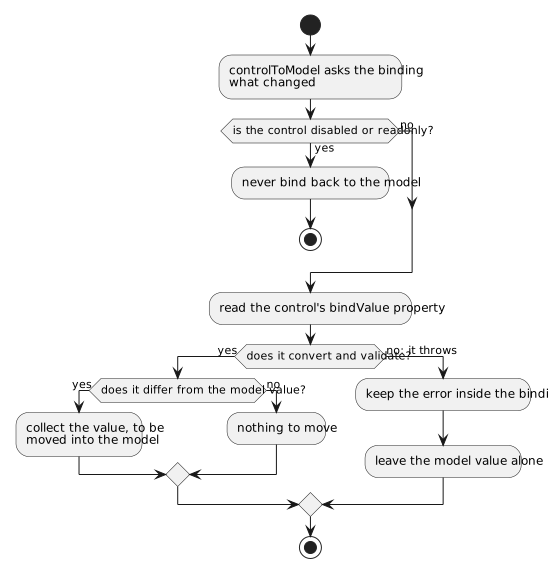
That quiet is deliberate. Reading a control with getValue() puts any error
straight on the screen, which is right when a handler asks for a value on
purpose - but binding reads every control on every request. If it used
getValue(), filling in the first field of a form would light up every other
field in red before the user had reached them. So bindings read bindValue
instead: getBindValue() converts and validates exactly like getValue(), but
it throws without reporting, and the binding catches that and holds on to it.
Which leaves the errors known but invisible, and that is what bindErrors()
is for. It walks the tree from the node it is called on, hands every kept error
to its control - which is what makes the field red and the message appear - and
returns true if it found any.
Call bindErrors() at the top of every handler that is about to use model
data, and return when it is true. Without it a Save works on a model that
silently kept its old value, and the user is never told.
You do not need to report anything yourself when it returns true: the messages are already on screen by then.
Binding a style
The last kind of binding does not move a value at all - it maps one onto a css class:
ComboFixed2<OrderState> stateC = ComboFixed2.createEnumCombo(OrderState.class);
stateC.bind().to(m_order, AlbumOrder_.state());
stateC.immediate();

Div box = new Div("dm-tut");
cp.add(box);
box.add("The state of this order decides the colour of this box.");

new StyleBinder()
	.define(OrderState.New, "dm-tut-new")
	.define(OrderState.Paid, "dm-tut-paid")
	.define(OrderState.Shipped, "dm-tut-shipped")
	.define(OrderState.Cancelled, "dm-tut-cancelled")
	.bind(box).to(m_order, AlbumOrder_.state());
Change the state and the box changes colour. StyleBinder is a map from model
value to css class name; bind(node).to(instance, property) attaches it to a
node as a binding like any other, and on every way out it removes the class it
added last time and adds the one the current value asks for. Any node will do -
it is a NodeBase, not a control, so a panel, a row or a whole section can carry
one.
A style binding only ever moves model to control: it has no value to give back, and it can never be in error. Which is the same rule as every other binding that is not a value.
The control side is one property, never a path
LookupInput<Customer> customerC = new LookupInput<>(QCriteria.create(Customer.class));
cp.add(customerC);

//-- Wrong: this throws while the page is being built.
customerC.bind("value.id").to(m_model, "customerId");
The model side of a binding may be a dotted path - to(m_order, "customer.name")
walks that path on every move, and it is a normal thing to do. The control side
may not: bind() and bind(PROPERTY) refuse a name containing a dot with a
ProgrammerErrorException, thrown at the moment the binding is made, so you find
out in createContent() rather than through a screen that misbehaves.
The reason is what such a binding would have to do on the way out:
- read
m_model.getCustomerId(), - and call
setId()on whatever objectcustomerC.getValue()returns.
That second step does not give the control a new value - it reaches inside the
value the control is already holding and changes a property of it. The control
never sees an assignment, so nothing marks it as changed and nothing is rendered;
and if its value happened to be null there is no object to assign into at all.
The screen keeps showing what it showed before, while the model insists the move
was made.
Bind the control's own value instead, and let the model own the derivation:
customerC.bind().to(m_model, SendInfoModel_.customer());
getCustomerId() on the model, if something still needs one, is then a getter
over getCustomer() - a plain question about the model, asked where the model
lives.
Where to go from here
Binding has a bit more to it than fits here: the order in which bindings run when one setter changes another property, and what "changed" means for a value that is a list or a mutable object. Both are in Data binding details.