
Metadata
The table in showing rows had to be told that the duration column is a duration and that the price column is money. The edit screens in data binding had to be told the same things again, plus a label per field. That is the same knowledge, written down in as many places as there are screens - and each of those places can be forgotten when the field changes.
DomUI has one place for it. Every class has a metadata model describing its properties: what each one is called on screen, how long it is, whether it is required, how its value should be shown, which of them a table shows and in what order. Screens ask for that model instead of repeating it.
- A form that repeats nothing
- Where it comes from
- Asking for the model yourself
- What metadata decides
- The label
- Which control
- The limits of the field
- How the value is shown
- The table, the sort order and the search fields
- Labels for enum values
- Internationalization
A form that repeats nothing
Track track = getSharedContext().get(Track.class, 1L);

//-- Not one label, size, converter or mandatory marker here.
FormBuilder fb = new FormBuilder(cp);
fb.property(track, Track_.name()).control();
fb.property(track, Track_.composer()).control();
fb.property(track, Track_.milliseconds()).control();
fb.property(track, Track_.unitPrice()).control();
fb.property(track, Track_.album()).readOnly().control();
fb.property(track, Track_.mediaType()).readOnly().control();

//-- A RowRenderer without a single column() call.
SimpleSearchModel<Track> model = new SimpleSearchModel<>(this, QCriteria.create(Track.class));
DataTable<Track> dt = new DataTable<>(model, new RowRenderer<>(Track.class));
cp.add(dt);
dt.setPageSize(5);
cp.add(new DataPager(dt));
Nothing in that code says "Title", "Duration" or "Price". Nothing asks for a
duration to be shown as 5m 43s 719ms or a price as $ 0.99. Nothing marks
three of the fields mandatory, and nothing says which five columns the table has
or that it starts out sorted on the title. All of it comes from Track, and the
box at the bottom of the demo prints the metadata that produced it.
Where it comes from
A class's metadata model is built once, in steps, each adding to what the step before it found:
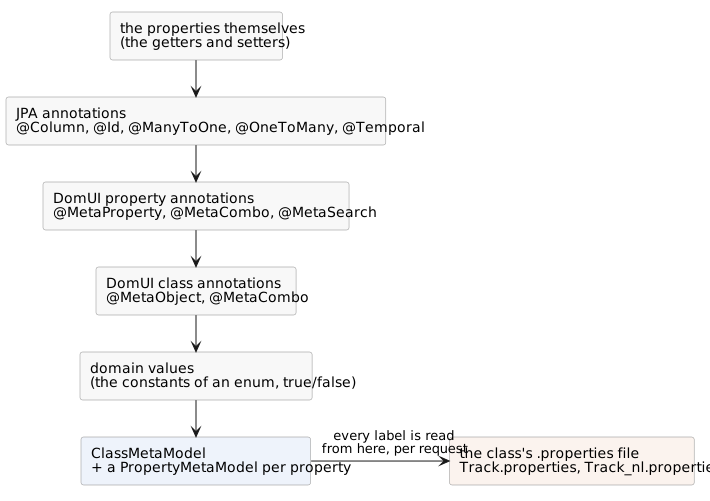
Each step may override what the one before it found, so a @MetaProperty that
names a converter wins over whatever the type would have given, and a
@Column(length = 200) sets a length that no annotation of DomUI's own had to
repeat.
The .properties file is not part of that: the model is built once and cached,
but a label is looked up in the bundle every time it is asked for, using the
locale of the request that is asking. That is what lets the same cached model
answer "Title" and "Titel" in the same second, and it is where the second half of
this page starts.
This is what Track says, and it is the whole of it:
@MetaObject(defaultColumns = {
	@MetaDisplayProperty(name = "name", displayLength = 30)
	, @MetaDisplayProperty(name = "milliseconds", displayLength = 12)
	, @MetaDisplayProperty(name = "unitPrice", displayLength = 8)
	, @MetaDisplayProperty(name = "album.title", displayLength = 20)
	, @MetaDisplayProperty(name = "album.artist.name", displayLength = 40)
}, defaultSortColumn = "name", searchProperties = {
	@MetaSearchItem(name = "name")
	, @MetaSearchItem(name = "album")
	, @MetaSearchItem(name = "album.artist")
})
@Entity
@Table(name = "Track")
public class Track extends DbRecordBase<Long> {

	@Column(name = "Name", length = 200, nullable = false)
	public String getName() { ... }

	@MetaProperty(converterClass = MsDurationConverter.class)
	@Column(name = "Milliseconds", precision = 10, scale = 0, nullable = false)
	public long getMilliseconds() { ... }

	@MetaProperty(numericPresentation = NumericPresentation.MONEY_FULL)
	@Column(name = "UnitPrice", precision = 10, scale = 2, nullable = false)
	public BigDecimal getUnitPrice() { ... }

	@ManyToOne(fetch = FetchType.LAZY, optional = false)
	@JoinColumn(name = "AlbumId")
	public Album getAlbum() { ... }
}
and this is Track.properties, next to Track.java:
name.label=Title
composer.label=Composer
album.label=Album
album.title.label=Album
album.artist.name.label=Artist
genre.label=Genre
mediaType.label=Media type
milliseconds.label=Duration
bytes.label=Size in bytes
unitPrice.label=Price
What each source contributes
| From | What it gives |
|---|---|
@Column(length) |
the maximum input length of a string field |
@Column(precision, scale) |
the size and the range check of a numeric field |
@Column(nullable = false) |
the field is required |
@Id, @EmbeddedId |
the primary key, and "this is a persistent class" |
@ManyToOne, @OneToOne |
an UP relation; optional = false makes it required |
@OneToMany |
a DOWN relation (a list of children) |
@Temporal |
date, time or date-and-time |
@Transient |
the property is not persistent |
@MetaProperty |
everything JPA cannot say: converter, numeric presentation, validators, a regexp, display size, sortability, read-only, a required-ness of its own |
@MetaObject |
the default columns of a table, the default sort column, the search fields |
@MetaCombo |
how instances of this class are shown in a combobox |
@MetaSearch (on a getter) |
this property is a search field |
ClassName.properties |
every label and hint, and the labels of enum values |
@MetaProperty adds to what was already found - it does not restate it.
Do not copy a length or a required-ness out of @Column into it; only put in
it what JPA has no way of saying.
Metadata is not only for entities. Any class works: the demo's Shipment is a
plain class with a @GenerateProperties annotation and a .properties file next
to it, and it gets labels, control choice and enum labels exactly like Track
does.
Asking for the model yourself
ClassMetaModel cmm = MetaManager.findClassMeta(Track.class);
PropertyMetaModel<?> pmm = cmm.getProperty("unitPrice");

PropertyMetaModel<BigDecimal> typed = MetaManager.getPropertyMeta(Track.class, Track_.unitPrice());

pmm.getDefaultLabel();          // "Price"
pmm.getPrecision();             // 10
pmm.getNumericPresentation();   // MONEY_FULL
pmm.isRequired();               // true
MetaManager is the way in. findClassMeta(clz) gives the ClassMetaModel -
built once and cached - and getPropertyMeta gives one PropertyMetaModel,
either from a name or from a typed property.
A dotted name walks a relation: cmm.getProperty("album.artist.name") returns a
property model that reads the artist name through the album, and it has the
metadata of the property it ends at.
On a PropertyMetaModel |
|
|---|---|
getName() |
the property name |
getActualType() |
the type of the value |
getDefaultLabel() |
the label, in the language of this request |
getDefaultHint() |
the tooltip text, or null |
getLength() |
the maximum length, or -1 |
getPrecision() / getScale() |
the numeric size, or -1 |
getDisplayLength() |
the width to show, in characters, or -1 |
isRequired() |
whether a value must be given |
getReadOnly() |
YES if it may not be edited |
getConverter() |
the converter set on the property, or null |
getNumericPresentation() |
MONEY_FULL, PERCENTAGE, NUMBER, ... |
getTemporal() |
DATE, TIME, DATETIME |
getValidators() |
the validators to run on input |
getRelationType() |
NONE, UP or DOWN |
getDomainValues() |
for an enum or boolean: the possible values |
getDomainValueLabel(loc, value) |
the label of one of those values |
getSortable() |
whether a table may sort on it, and which way first |
On a ClassMetaModel |
|
|---|---|
getProperties() |
all properties |
getProperty(name) / getProperty(QField) |
one property, dotted path allowed |
getPrimaryKey() |
the primary key property, or null |
isPersistentClass() |
whether it is mapped to a table |
getTableDisplayProperties() |
the default columns from @MetaObject |
getDefaultSortProperty() / getDefaultSortDirection() |
the initial sort |
getSearchProperties() |
the default search fields |
getComboDisplayProperties() |
how one instance is shown in a combo |
getDomainValues() / getDomainLabel(loc, value) |
for an enum: its values and their labels |
getClassBundle() |
the .properties file of this class |
getUserEntityName() / getUserEntityNamePlural() |
the entity.name and entity.pluralname keys |
What metadata decides
The label
FormBuilder.property() takes the label from getDefaultLabel(), which reads
<propertyname>.label from the class bundle. If the bundle has no such key the
property name itself is used, so a missing translation shows up on screen as
mediaType rather than as an empty label - which is how you find it.
<propertyname>.hint gives the tooltip, and a table column, a search field and a
lookup all take their header from the same place. Say it once, and it is right
everywhere - and it changes everywhere at the same time.
Which control
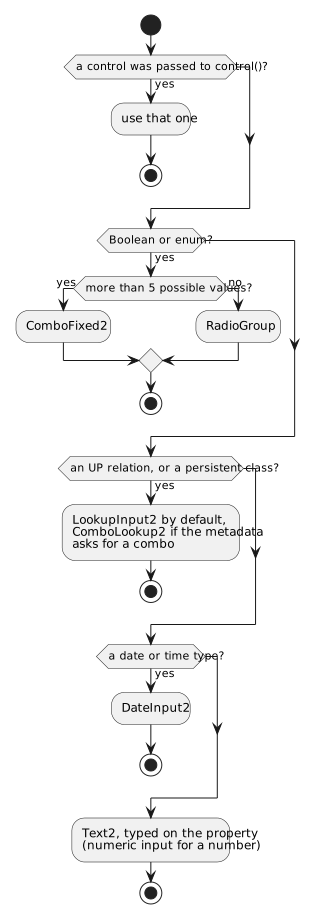
FormBuilder.property(...).control() without an argument asks the
ControlCreatorRegistry for a control. Every creator in it scores the property
and the highest score wins, so the choice is made from the metadata alone: the
type of the value, whether it is a relation, and the hints the annotations left.
An enum of six values becomes a combobox and an enum of three becomes a row of
radio buttons; a relation becomes a lookup, which is what a relation gets unless
something asks for a combobox.
That asking is componentTypeHint, and it beats everything else:
@MetaProperty(componentTypeHint = Constants.COMPONENT_COMBO)   // "comboLookup"
public Genre getGenre() { ... }
Constants.COMPONENT_LOOKUP forces the other way, and a hint containing
textarea gets a TextArea where a string would otherwise get a one-line input.
Passing a control to control(...) yourself of course settles it entirely.
Whatever is chosen is then configured from the same metadata: mandatory when the
property is required, disabled when it is read-only, and - unless
DomApplication.setDefaultHintsOnControl(false) turns it off - the tooltip from
the property's hint.
The limits of the field
For a Text2 the numbers turn into the size of the input box and into what may
be typed into it:
@Column(length = 200)becomesmaxLength(200), and - when that is a reasonable width - the displayed size too.@Column(precision = 10, scale = 2)becomes a validator that rejects a number outside that range, plus a calculated width that leaves room for the minus sign, the thousand separators, the decimal separator and, for money, the currency symbol.@MetaProperty(displaySize = ...)overrides the calculated width without touching what may be entered.@MetaProperty(validator = ..., regexpValidation = ...)adds validators that run whengetValue()is called.
JPA's @Column(length) defaults to 255, which makes it impossible to see
whether a length was given or not. DomUI therefore accepts 255 only for
String properties, and ignores it elsewhere. If a string really is 255 long,
say so - it will be used.
How the value is shown
A BigDecimal is just a number until something says what kind of number it is.
That is numericPresentation:
@MetaProperty(numericPresentation = NumericPresentation.MONEY_FULL)
@Column(name = "UnitPrice", precision = 10, scale = 2, nullable = false)
public BigDecimal getUnitPrice() { ... }
The ConverterRegistry picks a converter for a value by asking every converter
factory to score the type plus the property metadata, so the money factory
claims a BigDecimal that says MONEY_FULL and the plain number factory gets
the rest. The same happens for a date: @Temporal(DATE) gets a date converter
where a plain Date gets a date-and-time one.
Where no factory can work it out, name the converter yourself:
@MetaProperty(converterClass = MsDurationConverter.class)
public long getMilliseconds() { ... }
A converter set on the property beats everything else, and it works in every place the value is shown - a form field, a table cell, a read-only display - because they all ask the same registry. That is the difference between putting it on the property and putting it on one column of one table.
The table, the sort order and the search fields
@MetaObject describes the class as a list of rows:
defaultColumnsis what aRowRenderershows when you define no columns yourself, in the order given. A@MetaDisplayPropertymay walk a relation (album.artist.name), give adisplayLength, a converter of its own, or ajointhat glues it to the next column into one cell.defaultSortColumnanddefaultSortOrderare the sort the table starts with.searchPropertiesis what aSearchPanelputs on the screen when it is given no property list.
Define one column on the renderer and none of the default columns are used - it
is all or nothing. The default sort still applies either way: a renderer with no
sortdefault() of its own falls back to the class metadata's default sort
property.
Labels for enum values
An enum value has a name, and a name is not a label. Its labels go in a
.properties file next to the enum, keyed by the constant:
# ShippingMethod.properties
Standard.label=Standard delivery
Express.label=Express (next day)
PickUp.label=Pick up at the shop
and one property may override one of them, in the bundle of the class that has that property:
# Shipment.properties
method.label=Delivery
returnMethod.label=If it comes back
returnMethod.PickUp.label=Customer brings it back
insured.label=Insured
state.label=State
FormBuilder fb = new FormBuilder(cp);
fb.property(m_shipment, Shipment_.method()).control();
fb.property(m_shipment, Shipment_.returnMethod()).control();
fb.property(m_shipment, Shipment_.insured()).control();
fb.property(m_shipment, Shipment_.state()).control();
The first two fields hold the same enum, and PickUp reads differently in each:
the second one has an override for it. The lookup goes
<property>.<VALUE>.label in the bundle of the class that has the property,
then <VALUE>.label in the bundle of the enum, and only then falls back to
name().
Insured is a Boolean, and its two labels are not yours at all - Yes and
No come from DomUI's own bundle. And State is a combobox rather than a row of
buttons only because its enum has six values instead of three.
To do the same lookup outside a control:
MetaManager.getEnumLabel(ShippingMethod.PickUp);                     // the enum's own bundle
MetaManager.getEnumLabel(propertyMeta, ShippingMethod.PickUp);       // the property's override first
MetaManager.createEnumList(ShippingMethod.class);                    // value + label, ready for a combo
Internationalization
Every label so far came out of a .properties file, and every one of those
files can have a translation next to it. That is the whole of it: nothing else
needs to change to make the screens above speak another language.
One page, two languages
setPageTitle($("title"));
cp.add(new HTag(1, $("title")));

Invoice invoice = getSharedContext().get(Invoice.class, 1L);
FormBuilder fb = new FormBuilder(cp);
fb.property(invoice, Invoice_.invoiceDate()).readOnly().control();
fb.property(invoice, Invoice_.total()).readOnly().control();
fb.property(invoice, Invoice_.customer()).readOnly().control();
fb.property(invoice, Invoice_.billingAddress()).readOnly().control();
fb.property(invoice, Invoice_.billingCity()).readOnly().control();
fb.property(invoice, Invoice_.billingCountry()).readOnly().control();
Click Nederlands. Every label changes, the date turns from 2007-01-02 into
02-01-2007 and the total from 3.96 into 3,96 - and not a line of the page
knows about it.
Two fields stay English: Invoice_nl.properties has no key for them, so those
two labels come from Invoice.properties. Translation falls back per key,
not per file.
Then click Deutsch. There is no German bundle anywhere, so the application's own texts fall back to their default file - which is English here - while the framework's own texts fall back to theirs, which is Dutch. The date is German, because that comes from the JDK and not from a bundle.
DomUI's own bundles have Dutch as their default language, with English in
the _en files. An application whose users are neither Dutch nor English will
see Dutch in the framework's own texts - pager text, error messages, Yes and
No. Either supply the missing translations or force a supported locale in
getRequestLocale().
The locale of a request
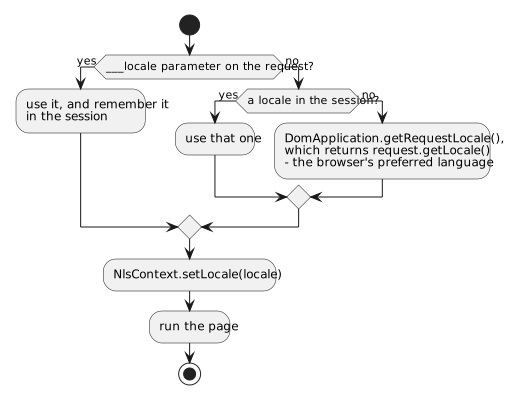
A DomUI server serves many languages at the same time: the locale belongs to the
request, not to the application and not to the machine. Before a request is
handled the locale is worked out and put in NlsContext, and everything that
formats or translates reads it from there:
Locale loc = NlsContext.getLocale();
It is a ThreadLocal, so every request has its own and no call needs to carry a
locale parameter. This is the call to use anywhere your own code needs the
language of the user it is answering.
By default the locale is the browser's preferred language, as the servlet container reports it. There are two ways to decide otherwise:
- Add
___locale=nl_NLto the URL (three underscores). It applies to that request and is kept in the session, so it holds until it is set again. This is what the language links on the demo page do. - Override
getRequestLocale()in yourDomApplication:
@Override
public Locale getRequestLocale(HttpServletRequest request) {
	return DUTCH;
}
Money is a separate question, because the language someone reads in and the
currency they pay in are not the same thing. NlsContext.getCurrencyLocale()
answers it, set per request with setCurrencyLocale() and falling back to
setDefaultCurrencyLocale().
Why the JDK's own localization is not used
DomUI does not use java.util.ResourceBundle. It is built for a program that
picks a language once, at startup, and a server is not that program - it answers
one user in Dutch and the next in English on the same second. Four concrete
things follow:
- A
ResourceBundleis one language.ResourceBundle.getBundle(name, loc)hands back a bundle already bound toloc. There is no object that means "all the translations of these keys", so a bundle cannot be astatic finalconstant and cannot be passed around: every place that reads a message must also know the locale and look the bundle up again. - A missing translation silently becomes the wrong language. When the JDK
finds no bundle for the requested locale it does not go to the base file. It
first retries the whole search with
Locale.getDefault()- the locale of the machine the server runs on. A missing Dutch file on a server started in a French locale gives that user French, not the base language. This is decided byResourceBundle.Control.getFallbackLocale(), and turning it off means writing aControlsubclass. - The search order cannot be extended. DomUI resolves a bundle over four
levels - dialect, language, country, variant - so that one installation can
override single texts of an otherwise shared application.
ResourceBundlehas no room for a level it does not know about. - The encoding is a trap. See the warning at the end of this page: a
.propertiesfile that is not UTF-8 is not rejected, it is quietly read in another encoding.
DomUI's answer is BundleRef, and the difference is one sentence: a JDK bundle
decides the language when it is loaded; a BundleRef decides it at every
lookup, from NlsContext.getLocale().
BundleRef: all translations of a set of keys
public static final BundleRef BUNDLE = BundleRef.create(UserInfoPage.class, "messages");

String text = BUNDLE.getString("ui.dt.empty");
String message = BUNDLE.formatMessage("ui.pagertext", 12, 120, 1212);
A BundleRef names a place: the resource files called messages*.properties
in the package of UserInfoPage. It has no language of its own, which is why it
is a constant and why it can be handed around freely. formatMessage fills the
{0}, {1} placeholders using the JDK's MessageFormat, and picks the file to
read them from at that moment.
Two BundleRef.create() calls for the same place return the same instance,
so declaring the same constant in five classes of a package costs one bundle.
The files themselves are ordinary Java .properties files:
# messages_nl.properties
ui.pagertext=Pagina {0} van {1}, {2} record(s)
ui.pagerover=Het aantal resultaten is afgekort naar {0}
ui.pagerempty=Geen resultaten
Which file, and in which order
For a request in nl_NL, messages is looked for as:
messages_nl_NL.properties
messages_nl.properties
messages.properties
and with a dialect set (NlsContext.setDialect()) that dialect is tried at each
level first. Every file that exists is kept, in that order, and a key is looked
up in all of them until one has it. So a translation may be partial: put the
few keys that differ between en_GB and en_US in their own files and leave the
rest in messages_en.properties. It is what makes the two English labels appear
on the Dutch demo page above.
The file without any language in its name is the default, and it must exist: it is what a locale nobody translated for falls back to. Everything in it should be in one and the same language - whichever language your application treats as its base.
Bundle codes instead of strings
A String key is a poor way to name a message: it is not checked, it must be
remembered, and on its own it does not say which bundle it lives in. An enum
implementing IBundleCode is both at once.
public enum FormulaError implements IBundleCode {
	attributeReferenceExpected,
	invalidRealNumber,
	invalidNumber
}
The bundle is FormulaError.properties, in the same package as the enum, and
every constant is a key in it. Getting the text needs nothing else:
IBundleCode code = FormulaError.invalidNumber;
String message = code.format(someValue);
String plain = code.getString();
Because a code carries its own bundle it can be passed anywhere a message is wanted, which is what the framework does with its own:
throw new CodeException(FormulaError.invalidNumber, input);          // a translated exception
UIMessage.error(FormulaError.invalidNumber, input);                  // a translated error on the screen
fb.property(order, AlbumOrder_.copies()).label(MyLabels.copies).control();
DomUI's own messages are the enum to.etc.domui.util.Msgs, over
to/etc/domui/util/messages.properties. Msgs.mandatory, Msgs.notValid,
Msgs.uiPagerText and the rest are what every validation error and every
component text on the screen comes from - which is why they translate with
everything else.
This is the way to do message bundles. Use it rather than string keys.
The bundle of a page, and $()
Every NodeBase - so every page, every fragment, every component - can look up a
text without naming a bundle at all:
MsgBox2.on(this).info($("recordNotFound", getName()));
$() finds the bundles that belong to the class it is called on, reads the key
from the first one that has it, and runs MessageFormat over the result with the
remaining arguments. The bundles it searches are collected once per class:
ClassName.properties, next to the class;messages.propertiesin the class's own package;messages.propertiesin each package above that one;- and then the same three again for the superclass, and its superclass, up to the end of the hierarchy.
The first bundle that has the key wins, and the list starts at the actual class.
That is what makes a text overridable: a CustomerListPage extending an
AbstractListPage whose button text comes from $("newButton") only has to put
newButton=... in CustomerListPage.properties to change it, without touching
the base class.
setComponentBundle() replaces the whole search with one bundle you name. It
has to be called before the first $(), and it is worth it only when a set of
components genuinely shares one bundle.
The keys metadata looks for
This is where the two halves of this page meet. The bundle that
ClassMetaModel.getClassBundle() returns is an ordinary BundleRef -
ClassName.properties next to the class - so everything above about
translations, fallback and partial files applies to labels, unchanged:
| Key | What it names |
|---|---|
<property>.label |
the label of a property |
<property>.hint (or .help) |
its tooltip |
<path.to.property>.label |
the label of a property reached over a relation, e.g. album.artist.name.label |
<VALUE>.label |
in an enum's bundle: the label of that constant |
<VALUE>.hint |
its tooltip |
<property>.<VALUE>.label |
in the owning class's bundle: that value's label for that property only |
entity.name |
the name of the class in the user's words, singular |
entity.pluralname |
the same, plural |
Add Track_nl.properties next to Track.properties and every screen showing a
track is Dutch for a Dutch user - forms, tables, search panels and lookups
together, without one of them being changed.
Properties files are UTF-8
Save every .properties file as UTF-8. DomUI reads bundles with
PropertyResourceBundle, which on Java 9 and later decodes UTF-8 - but when
the bytes are not valid UTF-8 it does not fail. It silently re-reads that one
file as ISO-8859-1 and carries on.
That fallback is what makes a wrong encoding so unpleasant. It is decided per file and nothing is logged, so a project can be half UTF-8 and half something else and still look like it works:
- An ISO-8859-1 file is read back correctly, by accident: its accented bytes are
not valid UTF-8, so the fallback catches it. That holds until someone puts a
€, a—or a’in it - characters ISO-8859-1 does not have at all. - A Windows-1252 file is not ISO-8859-1, though the fallback reads it as one.
The two differ in exactly the byte range that holds
€,—,’and“- the characters people actually paste in - so those come out as control characters or as nothing. - A file that was UTF-8 and got saved once as Latin-1 can be valid UTF-8 for
the wrong characters.
cafébecomescafé, is read as UTF-8 without complaint, and shows up ascaféon the screen. - Because the decision is per file and depends on the bytes, adding one character to one bundle can flip how that bundle is read while every other file keeps working. Text that was fine yesterday is wrong today, in one language only.
So:
- Set the editor and the IDE to write
.propertiesin UTF-8 - not the platform default. In IntelliJ that is Settings > Editor > File Encodings, where the encoding of properties files is a setting of its own. - Keep
<project.build.sourceEncoding>UTF-8</project.build.sourceEncoding>in the pom, which is where the DomUI build has it. - Write the characters themselves.
\uXXXXescapes still work, but they exist only because the JDK once had no other option, and they make a translation unreadable to the person who has to check it. - To stop the fallback hiding a mistake, start the JVM with
-Djava.util.PropertyResourceBundle.encoding=UTF-8. A file that is not UTF-8 then throws instead of being quietly reinterpreted - which is what you want on a build server, and arguably everywhere.
The demo page above prints café, naïve, € 12,50, 20 °C, — an em dash from its
bundle in both languages. If any of that arrives mangled, the file was not UTF-8.