
Telling something to a user
A page usually answers by changing itself: a row appears, a field turns read-only, a total is recalculated. Sometimes that is not enough and the application has to say something - the save worked, the shop is out of stock, the delete needs confirming, the code fell over.
DomUI has three ways to do that, and they differ in how much they interrupt. A message box puts a window over the page and waits. A message is a line of text that stays on the page next to what it is about. An exception dialog shows what went wrong when code threw.
- A box on top of the page
- Asking something
- A message that stays on the page
- Showing an exception
- Where a message ends up: the error fence
- And the errors the bindings kept
A box on top of the page
MsgBox2.on(this).info("The album has been saved.");

MsgBox2.on(this).warning("This album has no tracks yet, so nobody can buy it.");

MsgBox2.on(this).error("The album could not be saved: the shop is closed.");
MsgBox2.on(node) makes a box and hangs it on the page that node belongs to, so
there is nothing to add() yourself; everything after it is the box being
described, and it appears when the request is finished.
The type picks the icon and the window title: info(), warning(),
error() and question(), each also available as a one-liner taking the text.
The text itself is either a String, a bundle code with parameters, or a piece
of DOM:
Div content = new Div();
content.add("The import finished with these results:");
Ul ul = new Ul();
content.add(ul);
ul.add(new Li().add("212 albums read"));
ul.add(new Li().add("3 albums skipped: no artist"));

MsgBox2.on(this)
	.title("Import finished")                  // Overrides the title the type would give
	.warning()
	.content(content)                          // Instead of .text(...)
	.button(MsgBoxButton.OK)
	.size(500, -1)                             // -1: as high as the content needs
;
text(IBundleCode, Object...) is the translated form of text(String), and
title(IBundleCode, Object...) the same for the title.
A message box does not block the code that made it. MsgBox2.on(this).info(...)
returns at once and the rest of the handler runs; the box only exists on the
next screen the user sees. Everything that has to happen after the user
answers belongs in the answer handler below - not on the line after the box.
Asking something
MsgBox2.on(this)
	.question()
	.text("Delete the album \"Big Ones\"? This cannot be undone.")
	.yesNo()
	.onAnswer(button -> {
		if(button == MsgBoxButton.YES) {
			delete();
		}
	});
The answer arrives in a handler, and which handler depends on what the buttons are:
| Buttons | Handler | What it gets |
|---|---|---|
yesNo(), continueCancel(), button(MsgBoxButton) |
onAnswer |
the MsgBoxButton that was pressed |
button(String label, Object value) |
onAnswer2 |
the value you attached to that button |
button(String label, IExecute) |
its own click handler | nothing - it does not answer the box |
input(label, control, handler) |
the input handler | the value of the control |
Add no buttons at all and the box gets CONTINUE, plus CANCEL when it carries
inputs. As long as you give no button a priority of its own, the box orders them
for you: the primary one (OK, YES, CONTINUE) ends up on the right, CANCEL
and NO to its left. Closing the box with the cross counts as CANCEL.
An input box asks for a value instead of a decision:
Text2<Integer> copies = new Text2<>(Integer.class);
copies.setMandatory(true);

MsgBox2.on(this)
	.title("Order")
	.input("Copies", copies, value -> order(value))
	.onValidate(button -> {
		if(button != MsgBoxButton.CONTINUE) {
			return true;                                  // Cancelling is always allowed
		}
		Integer value = copies.getValueSafe();            // Reports "mandatory" itself when empty
		if(null == value) {
			return false;
		}
		if(value.intValue() > 10) {
			copies.setMessage(UIMessage.error(TutorialMsg.orderTooLarge, 10));
			return false;                                 // Keeps the box open
		}
		return true;
	});
The control is an ordinary control - it converts, validates and reports the same
way it would on a page. onValidate runs before the answer handler and before
the box closes, and returning false from it leaves the box standing with the
message on it, which is how a box refuses an answer it cannot use.
A message that stays on the page
//-- About the page as a whole.
addGlobalMessage(UIMessage.warning(TutorialMsg.orderStockLow, "Big Ones", 3));

//-- About one field.
copies.setMessage(UIMessage.error(TutorialMsg.orderTooLarge, 10));
A UIMessage is what DomUI passes around instead of a string, because a string
on its own does not carry enough:
| Part | What it is for |
|---|---|
| the code and its parameters | an IBundleCode, so the text is looked up in the request's language when it is shown, not when the message is made |
| the type | MsgType.INFO, WARNING or ERROR - the icon, the colour, and which message wins when two land on one control |
| the error location | the name of the field it is about; it is printed in bold in front of the text |
| the node | the control it belongs to, which is what makes that control turn red |
| the group | a name, so a set of related messages can be removed in one call |
Making one is a static call per severity, and the location is either passed with it or added afterwards:
UIMessage.info(TutorialMsg.orderSaved, 3);
UIMessage.warning(TutorialMsg.orderStockLow, "Big Ones", 3);
UIMessage.error(TutorialMsg.orderTooLarge, 10);
UIMessage.error("Copies", TutorialMsg.orderEmpty);          // With an error location
UIMessage.error(TutorialMsg.orderEmpty).location("Copies"); // The same, chained
UIMessage.error(codeException);                             // The code and parameters of the exception
The bundle code is the same IBundleCode enum that
metadata uses for every other text: the message is
written down once, per language, in a .properties file next to the enum, and
the code that posts it never sees a sentence.
Putting a message on the screen is one of two calls:
control.setMessage(uiMessage)puts it on that control: the field is marked, and the message is shown with the field's label in front of it.setMessage(null)takes it off again. A control holds one message at a time, and a less severe message does not push a more severe one aside - an info message does not overwrite an error.node.addGlobalMessage(uiMessage)posts a message that is about no particular field.clearGlobalMessage()removes them again, andclearGlobalMessage(code)only those with one code.
Most of the messages on a screen are not posted by your code at all: a control
that cannot convert its input posts one itself, and so does every failing binding
when bindErrors() reports it. Which is why the last two sections of this page
are about where all of them end up.
Showing an exception
try {
	save();
} catch(Exception x) {
	ExceptionDialog.create(this, "Saving the order failed", x);
}
ExceptionDialog is the answer to "something threw and the user is still
sitting there". It shows a box with the message you passed as its title, and
what it puts inside depends on whether anything recognises the exception:
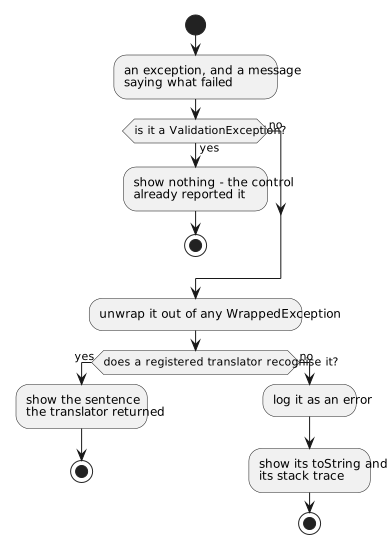
A translator is a function from an exception to an ExceptionPresentation -
a sentence, or a piece of DOM - which returns null for exceptions it does not
know. DomUI registers a handful of its own, and the Hibernate integration adds
one for constraint violations:
| Exception | What the user sees instead of a stack trace |
|---|---|
CodeException (and MessageException) |
the message of the exception, translated |
QConcurrentUpdateException, JPA's OptimisticLockException |
"somebody else changed this data" |
a SQLException with SQL state 23505 |
"this value already exists" |
Hibernate's ConstraintViolationException |
the message registered for that constraint name, or the 23505 text |
Your own exceptions get the same treatment by registering a translator for them:
ExceptionDialog.register(x -> x instanceof OutOfStockException osx
	? new ExceptionPresentation(TutorialMsg.orderOutOfStock.format(osx.getAlbum()))
	: null);
The list is global and the last translator registered is asked first, so this
belongs in the initialize() of your DomApplication - it is a decision of the
application, not of a page.
The try/catch around a call that may fail is so common that NodeContainer has
it built in:
executeWithDialog("Saving the order failed", () -> save());
It runs the code, shows the dialog if it threw, and returns false in that case.
The exceptions nobody catches
An exception that escapes a click handler ends up at the framework, which asks the application whether anything has been registered for it:
addExceptionListener(QNotFoundException.class, (ctx, page, source, x) -> {
	String url = DomUtil.createPageURL(ExpiredDataPage.class,
		new PageParameters(ExpiredDataPage.PARAM_ERRMSG, x.getLocalizedMessage()));
	UIGoto.redirect(url);
	return true;                                   // Handled: do not rethrow
});
That one is DomUI's own: a page whose record has meanwhile been deleted goes to
an "expired data" page instead of a stack trace. Listeners are registered per
exception class, the most specific class registered wins, and the handler
returns true when it dealt with the exception and false to let it travel on.
It is handed the request, the page and - when the exception came out of a click -
the component that was clicked, which is enough to put a message on the screen
next to it.
Where a message ends up: the error fence
Nothing in the code above says where a message is shown. That is decided by the tree, and the rule is one sentence: a message posted on a node travels upwards until it meets a node that is an error fence, and that fence shows it.
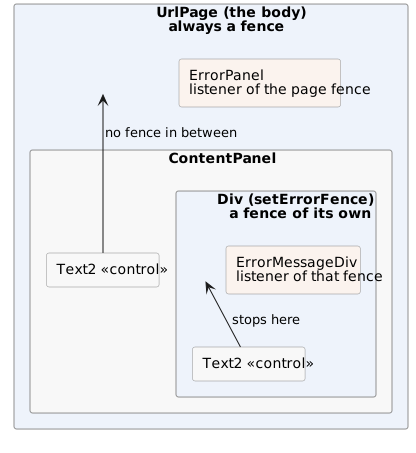
The demo page has three fences in it - the two panels and the page around them - and the same control error lands in a different place depending on which panel it was raised in:
A fence is not a component: it is an IErrorFence sitting on a
NodeContainer, holding a list of listeners. The pieces are:
- The page body is always a fence, made in the
Pageconstructor. A message can therefore never fall off the tree - if nothing catches it earlier the page does. - A container becomes one with
setErrorFence(), and stops being one withsetErrorFence(null). - Showing the messages is a listener's job. A component that wants to display
them implements
IErrorMessageListenerand registers itself on the fence it finds above it - which is exactly whatErrorPanelandErrorMessageDivdo. new ErrorMessageDiv(panel)does both at once: it makespanela fence and registers itself as its listener, which is the whole of what the demo page does per panel.- A message box catches its own messages.
MsgBox2puts anErrorMessageDivabove its content, so an error raised by a control inside the box - by itsonValidate, for instance - is shown in the box and does not also appear on the page behind it. - A fence with no listeners asks the application. When a message arrives and
nothing is listening,
DomApplication.addDefaultErrorComponent()is called to put a display component in the container - by default anErrorPanelat the top. Overriding that one method changes how messages look in the entire application; the demo application does it to put its messages under the page header rather than above it. PropagatingErrorFenceHandleris a fence that also passes what it catches to the fence above it, for a message that has to be visible in both places.
So a screen that shows its own messages - a panel, a tab, a dialog - is a fence plus a listener, and everything inside it keeps its complaints inside it.
And the errors the bindings kept
One source of messages does not report itself: a binding whose value would not convert keeps the error to itself, because reading every control on every request would light up half a form the user has not reached yet. Data binding has the mechanism; the rule it ends in belongs here as well:
cp.add(new DefaultButton("Save", () -> {
	if(bindErrors()) {                        // Anything wrong anywhere below this node?
		return;                               // Yes: it is on screen now, stop here.
	}
	save();
}));
bindErrors() walks the tree from the node it is called on, hands every kept
error to the control that produced it - which is what makes the field red and
sends the message off to its fence - and returns true if it found any. Call it
first in every handler that is about to use bound data, and return when it says
true: the user has been told by then.