
Building your first page
A DomUI page is a Java class. There is no template, no jsp, no html file and no javascript to write: you write a class, the class builds a tree of nodes, and DomUI renders that tree to the browser and keeps it in sync from then on.
This page builds three small ones. They only use tags - the DomUI equivalents of plain html elements. DomUI's components are built out of exactly the same material, so everything here keeps being true once you start using them.
A page is a class extending UrlPage
The smallest page that does something:
package to.etc.domuidemo.pages.tutorial.first;

import to.etc.domui.dom.html.Div;
import to.etc.domui.dom.html.UrlPage;

public class HelloPage extends UrlPage {
	@Override
	public void createContent() throws Exception {
		setPageTitle("My first page");

		Div box = new Div("dm-tut");
		add(box);
		box.add("Hello, world!");
	}
}
That is the whole page, and this is it running:
Three things are worth naming in those few lines:
- The class extends UrlPage. Every page does.
UrlPageis the<body>element of the rendered document - when youadd()something to the page, you are adding it inside the body. new Div(...)creates a<div>tag; the string is its css class. Every html element has a class like it into.etc.domui.dom.html:Div,Span,Para,HTag,ATag,Img,Table,UL,Liand so on.setPageTitle()names the page. That name is what the demo application's top bar and its breadcrumb show. It is not the browser tab title: that one is the page'stitleproperty (setTitle()), and when it is not set DomUI falls back togetDefaultPageTitle()in yourDomApplication.
Nothing here renders itself. You build a tree, and DomUI decides what html that becomes and when it needs to be sent.
The class name is the URL
A page is addressed by its fully qualified class name plus .ui, appended to
the root URL of the web application. The demo application above lives at
https://demo.domui.org/, and its class is
to.etc.domuidemo.pages.tutorial.first.HelloPage, so the page is at
https://demo.domui.org/to.etc.domuidemo.pages.tutorial.first.HelloPage.ui
There is no mapping to write and nothing to register: a class that extends
UrlPage and is on the classpath is reachable, and moving it to another package
changes its URL. The .ui extension is configured once, on the AppFilter in
web.xml; ui is the default.
The application's root URL is the exception: it shows the page returned by
getRootPage() in your DomApplication class - the demo returns its HomePage.
Giving a page its own URL
In most cases using the class name works just fine. But if you want you can define
your own URLs for a page, using the @UIPage annotation:
@UIPage("/welcome/hello")
public class WelcomePage extends UrlPage {
	...
}
which puts the page at /welcome/hello under the application's root URL - no class
name and no .ui extension. Nothing else changes: DomUI finds the annotation by scanning the
classpath at startup, and it uses that URL itself whenever it generates a link to
the page.
A segment written as {name} is a variable, and it must name a property of the
page annotated with @UIUrlParameter:
@UIPage("/invoice/{invoiceId}")
public class InvoicePage extends UrlPage {
	private Long m_invoiceId;

	@UIUrlParameter(name = "invoiceId")
	public Long getInvoiceId() {
		return m_invoiceId;
	}

	public void setInvoiceId(Long invoiceId) {
		m_invoiceId = invoiceId;
	}
}
/invoice/12345 now reaches that page with invoiceId set to 12345, and a link
made to it with that parameter comes out as /invoice/12345 rather than as a
query string. Naming a variable that is not a @UIUrlParameter property of the
page is an error, and so is two pages claiming the same pattern.
createContent() builds the page
createContent() is the method you write a page in. DomUI calls it for you, in
this order:
- the page class is instantiated with its no-argument constructor;
- parameters from the URL are injected into the page's properties that are
annotated with
@UIUrlParameter; createContent()is called, once, before the page is first rendered.
That order is the reason page content is built in createContent() and not in
the constructor: in the constructor the URL parameters have not arrived yet, so
a page that builds itself there cannot show anything that depends on them.
createContent() is called once per build, not once per request. A click,
a keystroke or any other event does not rebuild the page - the tree stays alive
between requests, and handlers change it in place. When you do want a page to
build itself again from scratch, call forceRebuild() on it: DomUI throws the
existing children away and calls createContent() again before the next
response goes out. We will see later that this is a common way for components
to rebuild their presentation when data changes.
A page is a tree of tags
Tags are added to the tag that must contain them, and that is all the structure there is:
public class HelloTreePage extends UrlPage {
	@Override
	public void createContent() throws Exception {
		setPageTitle("A tree of tags");

		Div box = new Div("dm-tut");
		add(box);

		box.add(new HTag(1, "Hello, world!"));

		Para para = new Para();
		box.add(para);
		para.add("This paragraph sits inside a div, and this ");
		para.add(new Span("dm-tut-hi", "span"));
		para.add(" sits inside the paragraph. What you add something to decides where it ends up.");
	}
}
add() on the page adds to the body; add() on a node adds inside that node.
The add(String) used above adds text, so a paragraph is written as the mix of
text and tags that it is. Because this is Java rather than a template, a loop is
a loop and a condition is a condition - building a list of rows is a for over
add() calls, and the compiler checks the result.
Reacting to a click
Any node can be given a click handler. The handler is ordinary server side Java:
public class HelloClickPage extends UrlPage {
	static private final String OFF = "#d9e8ff";

	static private final String ON = "#ffd9a0";

	private boolean m_on;

	@Override
	public void createContent() throws Exception {
		setPageTitle("Clicking a tag");

		Div box = new Div("dm-tut");
		add(box);
		box.add("Click me to change my color");
		box.setBackgroundColor(m_on ? ON : OFF);

		box.setClicked(() -> {
			m_on = !m_on;
			box.setBackgroundColor(m_on ? ON : OFF);
		});
	}
}
Click the box a few times:
The handler takes no arguments: box is a local variable of createContent(),
so the lambda already has the node it needs. It changes a field on the page and a
property of that node - and then it is done. There is no code that writes html, no
code that updates the browser, and no id to look up on the other side.
That last part is what DomUI does for you:
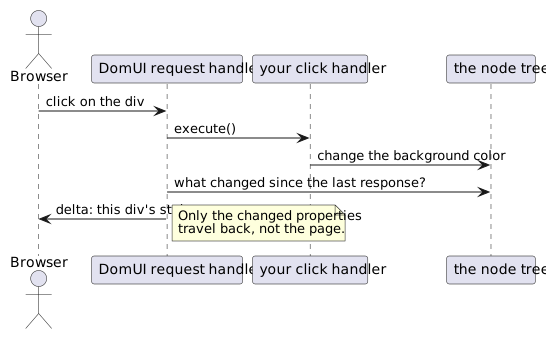
DomUI keeps the tree as it was last rendered to the browser. After your handler has run it compares the tree with that state and sends back only the difference. For the click above, the entire response is one line:
<changeTagAttributes select="#_2" style="background-color:#ffd9a0;" class="dm-tut" .../>
The page you see is never re-sent, and the browser never reloads - which is why "just change the node" is a complete answer.
When the click itself has more to say
A click sometimes carries more than the fact that it happened: where the pointer
was, and whether shift, control or alt was held down. setClicked2() hands the
handler a ClickInfo holding exactly that:
Div result = new Div();

Div box = new Div("dm-tut");
add(box);
box.add("Click me");
box.setClicked2(info -> result.add(new Div("", "Click: x=" + info.getPageX() + ", y=" + info.getPageY()
	+ ", shift=" + info.isShift() + ", ctrl=" + info.isControl() + ", alt=" + info.isAlt())));

add(result);
Click the box below, then click it again with shift down:
ClickInfo has the position of the click within the page (getPageX(),
getPageY()), the modifier keys that were down (isShift(), isControl(),
isAlt()) and isDoubleClick(), which is true when the same node was clicked
again within the double-click time. What it does not carry is the node - and it
does not need to: box and result are local variables the lambda captures,
exactly as with setClicked().
A node has one click handler, so setClicked2() replaces one set with
setClicked(), and the other way round. Use it only when the details are really
needed; almost every handler in a page is a plain setClicked().
Only tags so far
Everything above is a tag: a Div, a Para, a Span, an HTag. This is called
layer 0, and it is worth having seen, but it is not how you write screens
day to day. A real page uses components - inputs,
buttons, tables, lookup fields - which are themselves nodes built out of these
same tags, and it uses data binding to move
data between those components and your objects instead of setting values by hand.
All three pages above are in the demo application, under "Tutorial pages" on its home page. Every demo page has a source icon in its top bar that shows the Java source of the screen you are looking at.