
Using databases
Most pages exist to show something that is in a database. DomUI does not make you write SQL for that, and it does not tie you to one persistence framework either: you describe the question as a Java object and hand it to something that can run it.
Two classes carry that, and both live in to.etc.webapp.query:
QCriteria<T>is the question - "all albums whose title contains rock, by title, at most twenty of them". It is typed on the entity it selects, it knows nothing about databases or connections, and it does nothing until it is executed.QDataContextis the thing that executes it: a database connection, or a Hibernate session, or a JPA entity manager, in disguise.
A page gets its QDataContext from getSharedContext(), which every node in
the tree has. You do not create it and you do not close it - the page owns it,
and everything on the page shares that one context.
- Your first query
- The query and the thing that runs it
- Restrictions and combinators
- Querying over a relation
- Where to go from here
Your first query
public class QueryFirstPage extends UrlPage {
	@Override
	public void createContent() throws Exception {
		setPageTitle("Your first query");
		...
		Text2<String> titlePart = new Text2<>(String.class);
		titlePart.setValue("rock");
		Div result = new Div("dm-tut");

		FormBuilder fb = new FormBuilder(cp);
		fb.label("Album title contains").control(titlePart);

		cp.add(new DefaultButton("Search", () -> search(titlePart, result)));
		cp.add(result);
		search(titlePart, result);
	}

	private void search(Text2<String> titlePart, Div result) throws Exception {
		QCriteria<Album> q = QCriteria.create(Album.class);
		String part = titlePart.getValueSafe();
		if(part != null) {
			q.ilike("title", "%" + part + "%");
		}
		q.ascending("title");
		q.limit(20);

		List<Album> albumList = getSharedContext().query(q);

		result.removeAllChildren();
		result.add(new HTag(2, albumList.size() == 1 ? "1 album" : albumList.size() + " albums"));
		for(Album album : albumList) {
			Div line = new Div();
			result.add(line);
			line.add(album.getTitle() + " - " + album.getArtist().getName());
		}
	}
}
Change the word and press Search: the query is built again and run again, and
the result is rendered as plain Divs. Nothing in the page knows about databases
except the lines that build q and the one that runs it.
QCriteria.create(Album.class) is the whole of "select * from Album". Everything
after it narrows that down:
ilike("title", "%rock%")is a restriction: a condition on the where clause. There is one method per comparison -eq,ne,gt,ge,lt,le,like,ilike(case insensitive like),between,in,isnull,isnotnull.ascending("title")anddescending(...)order the result.limit(20)andstart(...)return a window of it.
Two things about that first line are worth saying out loud, because they hold for every query you will write:
- A
QCriteriais typed:QCriteria<Album>selects albums, soquery()hands back aList<Album>with no cast anywhere. - You restrict on the property names of the entity class, not on column
names.
"title"isAlbum.getTitle(); the mapping to theTitlecolumn is the ORM's business, not yours.
The value never becomes part of a statement string. q.ilike("title", part)
stores the value in the query tree, and the executor hands it to the database as
a JDBC parameter - the ? in a statement along these lines:
select this_.AlbumId, this_.Title, this_.ArtistId from Album this_
where lower(this_.Title) like ?
So a query built from what the user typed cannot be an SQL injection, however odd that input is.
The query and the thing that runs it
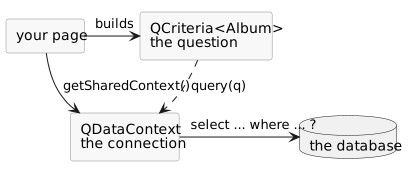
A QCriteria is not bound to a connection, a session or a transaction. It is a
value: you can build one in a method that has no database access at all, keep it
in a field, pass it to a component, and run it later - or twice, on two different
contexts. Only QDataContext touches the database.
A QDataContext does more than run queries. The handful you will actually use:
| Call | What it does |
|---|---|
query(QCriteria<T>) |
run the query, return List<T> |
queryOne(QCriteria<T>) |
run it and return the single result, or null; more than one is an error |
find(Class<T>, pk) |
load one record by primary key, or null |
get(Class<T>, pk) |
the same, but throws when it does not exist |
save(o), delete(o) |
make an object persistent, or remove it |
startTransaction(), commit(), rollback() |
the transaction around all of that |
The shared context
getSharedContext() is defined on every node, so a component deep in the tree
reaches the same context as the page itself without anyone passing it around.
That sharing matters: entities read on one context are only valid on that
context, so a page that mixes contexts ends up with two versions of the same
record.
The context belongs to the page's conversation.
It is opened the first time something asks for it during a request, and closed
again when the request ends and the conversation is detached - so a page waiting
for the user to press a button is not holding a database connection. The next
request opens a fresh one. Calling close() on it yourself does nothing: the
shared context ignores it, because it is not yours to close.
An entity is only alive on the context it was read on, and that context is gone once the request ends. A field of your page survives across requests, but the record you put in it does not stay usable - keep its primary key and read it again, rather than the record itself.
Restrictions and combinators
QCriteria<Track> q = QCriteria.create(Track.class);

String wordValue = word.getValueSafe();
if(wordValue != null) {
	//-- Everything added to this restrictor is combined with "or".
	QRestrictorImpl<Track> or = q.or();
	or.ilike("name", "%" + wordValue + "%");
	or.ilike("composer", "%" + wordValue + "%");
}

Integer minutesValue = minutes.getValueSafe();
if(minutesValue != null) {
	//-- Added to the query itself, so combined with the above using "and".
	q.ge("milliseconds", minutesValue.longValue() * 60000L);
}
q.ascending("name");
q.limit(20);
The grey box on that page is the query's own toString(), which is worth
looking at while you change the fields:
FROM to.etc.domui.derbydata.db.Track
WHERE (name ilike '%brown%' or composer ilike '%brown%') and milliseconds>=240000L
order by name ASC
Restrictions added to the query itself are combined with and - that is why
the two if blocks above need no bookkeeping at all: each one adds what it has,
and the ones that fire are anded together. This is what makes building a query
from a search screen easy, because a field the user left empty simply adds
nothing.
For or you need a different thing to add to. q.or() returns a
QRestrictorImpl<T>: another restrictor, with the same comparison methods, that
combines what is added to it with or and hangs the result in the query as one
condition. and() does the mirror image, and not() negates a group.
So a restrictor is a place to add conditions to, and which combinator it uses is the only difference between them. Nesting them builds an expression tree:
QCriteria<Track> q = QCriteria.create(Track.class);
QRestrictorImpl<Track> or = q.or();
or.and().eq("mediaType.name", "MPEG audio file").ilike("name", "A%");
or.and().eq("mediaType.name", "AAC audio file").ilike("name", "Z%");
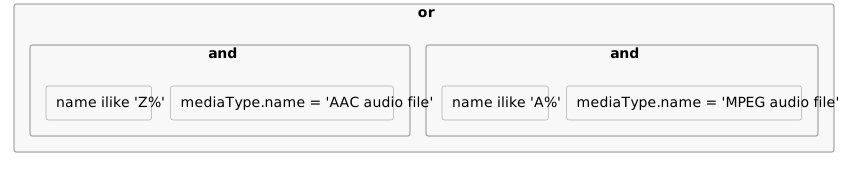
Levels of the same kind fold together, because a and (b and c) is
a and b and c. So an and() inside an and() costs nothing, and you never
have to think about where the brackets end up - only about which conditions
belong to which group.
Querying over a relation
An Album has an Artist above it and a list of Tracks below it; the Artist
in turn has a list of Albums. Both directions can be queried, but they are not
written the same way, and they do not mean the same thing.
Upwards: a dotted property
QCriteria<Album> q = QCriteria.create(Album.class);
//-- A dotted path walks to the parent record: this joins Artist in.
q.ilike("artist.name", "%" + part + "%");
q.ascending("artist.name").ascending("title");
A property name can be a path: artist.name is the name of the Artist
that this Album's artist property points at. The executor makes that a join.
Paths work wherever a property name does - in restrictions and in the ordering
alike, as above - and they can be as long as the model allows
(album.artist.name from a Track).
Downwards: exists
QCriteria<Artist> q = QCriteria.create(Artist.class);
//-- "exists": every artist that has at least one such album, once.
ExistsRestrictor<Album> albums = q.exists(Album.class, "albumList");
albums.ilike("title", "%" + part + "%");
exists() names the child collection to descend into - the albumList property
of Artist - and returns a restrictor for that child, on which you add
conditions in the usual way. Because Java has no first-class properties, the
element type cannot be derived from the property name, so you pass Album.class
as well.
What it generates is a subselect rather than a join:
select a.* from Artist a
where exists (select 1 from Album b where b.ArtistId = a.ArtistId and lower(b.Title) like ?)
That is deliberate, and it is the reason a child condition is written this way
instead of with a dotted path. Written as a join, an artist with four matching
albums comes back four times, and limit(20) then limits the joined rows
rather than the artists - so you get fewer than twenty artists, with nothing to
tell you that it happened. The subselect keeps the result one row per artist, so
limit() and start() mean what they say, and the database can stop reading a
child as soon as it finds one match.
limit() and start() in QCriteria limit the number of entities
returned, always. If you ever find a query where that is not true, the
query is wrong rather than the limit.
Where to go from here
Everything above builds the query and renders the result by hand, which is the
best way to see what the query layer actually does. In a real screen you would
hand the QCriteria to a table component and let it do the paging - and let a
search screen build the restrictions from what the user filled in.
The generic query layer (QCriteria)
goes further into the layer itself: what translates a query and how it is chosen,
what the translator makes of a path and of an exists, selections and aggregates,
subqueries, and running a query against a list instead of a database.