
Data binding details
Data binding shows what bindings do and
how to write them: bind().to(instance, property), the two moments in a request at which
data moves, one-way bindings to properties other than the value, and bindErrors(). This
page is about the machinery under that - why binding hangs off the request cycle instead
of off setters, where a binding object actually lives, in what order bindings run, and
what "changed" means for a value that is not a simple one.
- Soft binding versus hard binding
- Bidirectional and unidirectional bindings
- Where a binding lives
- Binding order
- Issues / pitfalls when using binding
Soft binding versus hard binding
DomUI data binding is what we call soft binding: the component remembers the
binding, and the data is actually moved by two global events - controlToModel() when a
request enters the server, and modelToControl() when the response is about to be
rendered back.
The alternative is "hard binding". There, all property setters of the model classes are
observable: they are coded so that they call listeners as soon as a setXxx() changes
the value of a property. That has three costs:
- Instrumenting every setter adds yet more boilerplate to Java's already very verbose properties.
- Having setters propagate changes makes it very hard to control when bindings execute.
- Since model objects may live quite a while, listeners on their properties have to be cleaned up, or the system leaks memory or CPU cycles.
Soft binding avoids all of it. The update moments are fixed by the request/response cycle, and because the binding is held by the control, a binding disappears the moment the control goes out of the page's scope - nothing to unregister. A control that is detached from the page simply stops binding, and starts again when it is added back.
Bidirectional and unidirectional bindings
A binding to a control's value is bidirectional; a binding to any other control property
moves data from model to control only. That is not a property of the individual binding
but of the kind: the builder creates a ComponentPropertyBindingBidi for the value and a
ComponentPropertyBindingUni for everything else.
There was a definite reason why the others needed to be unidirectional but I do not remember at this time.
One consequence is worth knowing when writing components: because only the value binds back, a control cannot return more than one value by exposing several bound properties. Whatever a control produces has to come out through its value.
A second consequence is the bindValue property. Bindings read getBindValue() rather
than getValue() precisely because they read every control on every request, and
getValue() reports conversion and validation failures to the screen as a side effect;
the tutorial describes what the binding
then does with the error it catches, and how bindErrors() gets it on screen.
Where a binding lives
The bind() call on a component creates a builder, which requires one of its to()
methods to be called to complete it. Completing the builder creates a
ComponentPropertyBindingBidi or ComponentPropertyBindingUni instance and stores it
inside the DomUI node of the control.
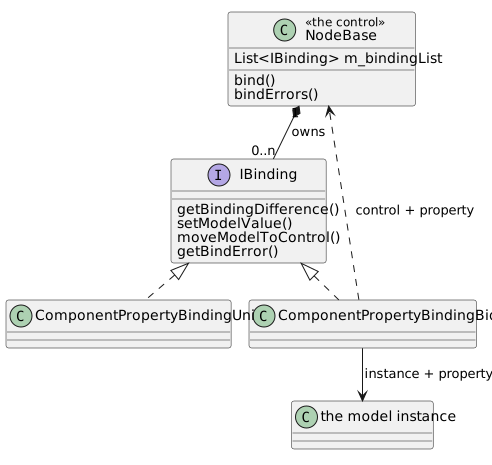
Because the bindings sit in the DomUI tree, walking the tree finds all of them, and lifecycle management is automatic: a node that is removed from the display tree takes its bindings out of play with it.
Binding order
Why is binding order important?
Components on the screen are ordered naturally, by their DOM location as created by the developer. But to handle binding properly it is important that binding is done in the proper order.
Let's give an example. We have a screen with two combo boxes:
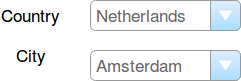
The "Country" combo contains a few countries, the "City" combo contains cities in all of these countries - not just of the selected country.
Now let's see what happens if we order binding in "dom order". Say the user changes "Netherlands" to "Great Britain":
- The request enters the server, and binding executes controlToModel.
- "Country" changed to "Great Britain":
- The model discovers that city "Amsterdam" is not in Great Britain, so it changes the "city" property to "London".
- But now we bind "city" which is "Amsterdam" from the UI code.
- The binder overwrites "London" with "Amsterdam", and updates "Country" back to Netherlands.
Clearly this is not what we want. We need some "order" imposed on the bindings, so that binding behaves as expected.
How DomUI orders binding
When a request comes in, the binding handler (DefaultBindingHandler) runs
controlToModel after all components have obtained their value(s) from the request. It
does that as follows:
- Walk the tree, and find all bindings.
- Check each binding for a changed value, i.e. where the model value differs from the
control value.
- For items that have the same value: ignore
- We now have a list of bindings whose value changed. Order these bindings as follows:
- A "deeper" binding comes before a "higher" binding
- Bindings at the same "level" execute in order of dom traversal.
- Now bind all values as per the above ordering.
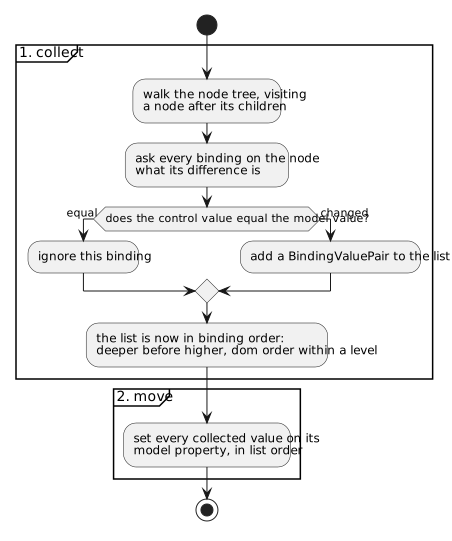
Collecting before moving is what makes the ordering possible at all: by the time the first value is written into the model, every control has already been asked what it holds, so a setter that changes another property can no longer be overwritten by a control that was read afterwards.
Moving the other way round, modelToControl walks the same tree but the other way about - a node before its children - so that a component may use binding internally as well.
By ordering like this most binding issues should resolve themselves automatically.
Issues / pitfalls when using binding
Binding performance
Bindings are visited twice every roundtrip: once to move controls to the model (at request entry) and once to move the model back to the controls (when the response leaves the server). Since bindings are handled so often we need special measures to ensure that this does not get slow.
The core of binding handling is walking the node tree, which is quite fast, so currently nothing is done to change that.
But moving data is optimized, and most of the optimizations are actually done by the components themselves.
All DomUI components check, whenever some setter is called, whether the value that is set actually changed. If it did not then the setter exits immediately. This ensures that controls are only really updated when some value actually changes on them.
Once data actually changes most DomUI components simply call forceRebuild(). This call
destroys their current presentation and causes them to be rebuilt at render time. If
multiple values change on a component forceRebuild() gets called every time - but this
call is very cheap. The actual (expensive) rendering only happens when it is time to
present the thing, and at that time no changes will be made anymore.
When has a value changed?
Most properties on a control are primitives or simple values (like dates and strings), so checking whether they change in the setter is quite cheap and well defined.
But the value property can also be some complex data structure like a class instance with multiple properties, a list or a map. For this there is an issue with "what is equal and what is not".
All controls handling simple values use equals() to detect whether a new value has been
set or not. But calling equals on things like collections and maps can be very expensive.
What is worse is that the most common case (nothing changed) is the most expensive: every
object in the list/map needs to be checked. Most DomUI components that have these kinds
of properties will use == (reference equality) instead of equals() (structural
equality) for these properties (including the value property), to prevent binding from
becoming glacially slow.
This means that to make DomUI aware of a change in these properties you need to create a new instance of the list, map or whatnot.
Complex values (values with thingies in them)
In fact, all values that are compound (consist of multiple thingies) are something to be aware of. Collections and Maps are obvious examples but it also goes for values that are classes with multiple values in them. Take for instance a class like this:
public class Person {
  public property String firstName;
  public property String lastName;
}
We can make some IControl<Person> which will edit/display a Person by binding it to
some datamodel property of the same type. This works fine if Person is immutable: in that
case the only way to change the data of a person is to create a new instance and do a
setValue() of that instance. This will be seen as a change by the control (as the
instance changes) and consequently the control's presentation is redone, showing the new
person data.
But if Person is mutable another way to change it is to do something like
p.setFirstName("Frots"). This changes the firstName property inside the instance, but
the control cannot notice that change because the instance it holds is still the same
instance, so comparing it (either by reference or even by equals()) never shows the
change. The net effect is that the data has changed - but the control shows an old value.