
Developer view of DomUI
A list of facts about DomUI: what it is written in, what it runs on, how a page gets to the browser, and what the code you write looks like.
- The stack
- Screen manipulation: DomUI's DOM
- Building an application
- Layering
- The Java "interface"
- State management
- Accessing data
- Testing
The stack
- DomUI is written in Java and builds on Java 21.
- It runs in a Jakarta EE servlet container (
jakarta.servlet): the demo application runs under Jetty 11 from Maven and under Tomcat 11 in production. - The build is Maven, and it compiles with the Eclipse batch compiler (ecj) rather than javac, because DomUI uses ecj's null analysis (see ecj in Maven).
- Hibernate 7.2 is supported out of the box, and plain JDBC is too.
- Kotlin can be used alongside Java; the framework itself is almost entirely Java.
- The browser side is small: TypeScript compiled to Javascript (see the browser-side build), scss (sass) for the styling, and jQuery 3.7.1 as the backing Javascript library.
- It supports all standard modern browsers.
- A set of base libraries with common Java functionality is part of DomUI, so the framework does not drag in a large dependency tree.
Screen manipulation: DomUI's DOM
A DomUI page builds a browser-like DOM on the server, as a tree of Java objects, and manipulates that tree to form the UI. The first request renders that tree as normal HTML. Every request after it renders only what changed:
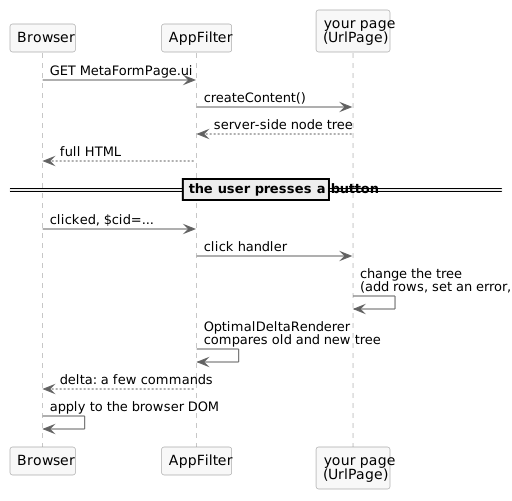
- The delta is a set of commands that bring the browser's DOM in line with the server's, and nothing more. Deleting 1000 rows of a 1001 row table does not send 1000 deletes: it sends one delete for the parent and one add for the row that remains.
- Because the delta is small, updating a page uses hardly any bandwidth.
- Calculating it is cheap as well.
OptimalDeltaRendererdoes not diff the DOM blindly; the tree records what changed while your code was changing it. - Because all of this happens in Java, on the server, the UI code can talk directly to whatever Java code is present. There are no DTOs and no web service layer between the screen and the data.
That last point is the large difference with Javascript-based UIs. A web service layer hides field types, and even the presence and names of fields. In DomUI, a change to the model is either fully refactorable by your IDE, or causes a compile time error rather than odd behavior at runtime.
Building an application
A DomUI application is a webapp: a web.xml declaring one DomUI filter, plus Java
classes.
<filter>
  <filter-name>DomFilter</filter-name>
  <filter-class>to.etc.domui.server.AppFilter</filter-class>
  <init-param>
    <param-name>application</param-name>
    <param-value>to.etc.domuidemo.Application</param-value>
  </init-param>
</filter>
<filter-mapping>
  <filter-name>DomFilter</filter-name>
  <url-pattern>/*</url-pattern>
</filter-mapping>
AppFiltermust be mapped to all URLs; it decides per request whether the URL is a DomUI page, a part, a resource, or something the webapp handles itself.- The
applicationparameter names yourDomApplicationsubclass. It is the application level singleton: it initializes the application and itsgetRootPage()defines the page the root URL shows. - A page is a class extending
UrlPagewhich builds its tree increateContent(). - The URL of a page is the full name of its class plus the extension
.ui-/demo/to.etc.domuidemo.pages.tutorial.meta.MetaFormPage.ui- which theextensioninit-param can change. A page can also be given a URL of its own with@UIPage("/track/{id}"). - Page parameters are URL parameters: they arrive as
PageParameters, and fields annotated with@UIUrlParameterare filled from them automatically. - Access control is per page, by annotation:
@UIRights("admin")on a page class means a user needs at least one of the named rights to open it. A user who is not logged in gets aNotLoggedInException, which the login handler turns into a login screen.
Layering
DomUI is layered, and each layer is written in terms of the one below it.
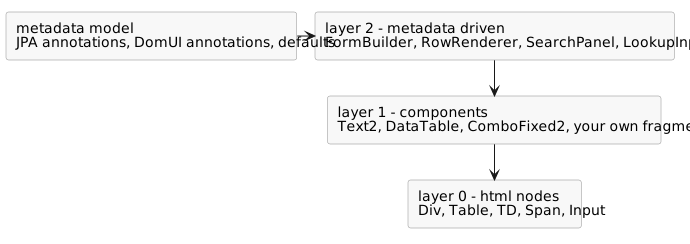
Layer 0 is the core HTML layer, to.etc.domui.dom.html: one class per HTML
element - Div, Table, TD. A node is either a NodeBase or, when it can have
children, a NodeContainer (which extends NodeBase). These base classes carry
all common behavior and all CSS handling: CSS properties are exposed as Java
properties and can be changed at runtime, which is how components get their
dynamic behavior. Layer 0 nodes have no extra functionality; they are as close to
the HTML elements as possible, and they are the building blocks for everything
above.
Layer 1 is the component layer: components built out of layer 0 nodes, which
add behavior. All input components are strongly typed and return their value in
the appropriate Java type - Text2<T> wraps an <input type="text">, so a
Text2<Integer> returns an Integer from getValue() (or null when empty).
That makes conversion and field level validation the job of the control itself,
using the converter and validator frameworks. A screen fragment you write
yourself is a component like any other, which is why building complex screens out
of components is easy and keeps them maintainable.
Layer 2 is driven by metadata:
builders and renderers that are told which property to show and work the rest
out. FormBuilder creates input forms, RowRenderer fills a DataTable's
columns, SearchPanel builds a search form, LookupInput2 looks up a record.
They take their labels, lengths, conversions and mandatoriness from the metadata
model of your data classes, so the same knowledge is not repeated per screen. A
builder is not part of the UI it creates: it creates layer 1 components and hands
them to your page.
The Java "interface"
- DomUI components prefer configuration over extension: instead of extending a DomUI class you call setters on it. Programmatic configuration is what makes metadata driven code possible - you cannot extend a class from code, but you can configure one.
- It uses configuration by exception: components behave sensibly and are fully styled without being told anything.
- Generics are used wherever they help, annotations where they are clearer.
- Most of DomUI is annotated with
@NonNulland@Nullableand is compiled with the Eclipse batch compiler, so null constraints are checked at compile time. - Because Java has no properties, DomUI generates typed properties: classes generated by an annotation processor holding every property of a data class and its type. Renaming a property then breaks the build instead of the screen, and because the properties carry their type most casts disappear.
- The metadata layer uses everything it can find - JPA and Hibernate annotations, DomUI's own annotations, and defaults - to decide how to show and handle data, and can be extended with your own sources.
State management
- DomUI pages are stateful: the page and the data it loaded stay in memory on the server between requests.
- That means no serialization, no detached objects, and no reloading of data on every request. Forms survive any number of round trips: on return everything is where it was.
- Each browser tab gets its own window session, and within it a page has a
conversation. Both are identified by the
$cidparameter on the page URL, which holds the window id (a generated id, one per tab) and the conversation number within it:$cid=<window id>.2. Tabs and windows are therefore largely independent of each other. - The servlet session is still used underneath, so the browser must accept the session cookie for DomUI to work.
- Creating a "hybrid" application - DomUI pages next to JSP or other AJAX pages - is not hard, but it does require understanding this state management, because the integration has to make sure DomUI pages are released from memory as soon as they are no longer needed.
Accessing data
- DomUI has an abstract and generic query interface, loosely modeled on Hibernate's Criteria but without its design flaws. Components that help define queries therefore never need hand-built SQL.
- It is Java-centric and uses the typed properties to make queries type-safe.
- The same
QCriteriaruns against Hibernate, against plain JDBC, and - throughMetaManager.query(collection, criteria)- against a collection of objects in memory. Other backends can be added. - Together with the component model this abstraction makes SQL injection impossible when used properly. It also absorbs library changes: the large changes between Hibernate versions needed work inside DomUI, and almost none in the applications using it.
- Because a page keeps everything it loaded, edit forms are simple: no models, no reloading, no serialization. The other side of that coin is that a form loading a great deal of data keeps it all for as long as the page lives.
Testing
- Pages are tested end to end with Selenium, from JUnit. Tests extend
AbstractWebDriverTest(a clean state per test) orAbstractSinglePageWebDriverTest, and get their driver fromWebDriverConnector; see testing. - Tests do not poke at HTML. They drive page objects: proxies like
CpText2,CpDataTableandCpButtonthat expose a control the way the Java control exposes it, so a test says "type this in the name field" rather than "find this<input>". - Those proxies do not have to be written by hand. With the application running
in development mode on a developer workstation, pressing
ctrl-shift-~twice in quick succession on a page runs thePageObjectGeneratorover it: it walks the built tree, generates a page object class per page and fragment, shows the generated code in a dialog and writes the files topageobjectsin the temp directory.
The same key without ctrl - shift-~ twice - is the other development mode
helper: it shows the chain of parent nodes above the node under the mouse, which
is how you find out which component built a given spot on the screen.