
The browser-side build
DomUI's browser code is TypeScript, and a full Maven build compiles it: it
installs node under to.etc.domui/node, runs the TypeScript compiler over
to.etc.domui/src/main/resources/resources/ts, and minifies the result.
$ mvn clean install -DskipTests -Dmaven.javadoc.skip=true
...
[INFO] --- frontend:install-node-and-npm (install node and npm) @ to.etc.domui ---
[INFO] Installing node version v22.22.1
[INFO] --- frontend:npm (npm install) @ to.etc.domui ---
[INFO] --- frontend:npm (npm run compile-typescript) @ to.etc.domui ---
[INFO] > tsc --allowjs --project src/main/resources/resources/ts/tsconfig.json
[INFO] > esbuild ... --minify --sourcemap --outfile=.../domui-combined-min.js
Nothing has to be installed for this: frontend-maven-plugin downloads its own
node, so the first build of a fresh clone needs network access and the ones after
it do not.
What is built
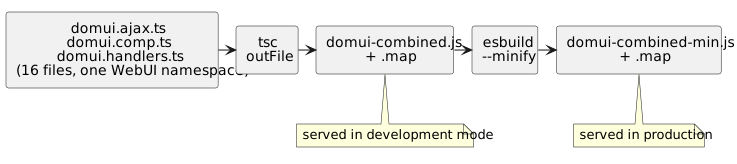
The sources are the .ts files in
to.etc.domui/src/main/resources/resources/ts. Together they form one
namespace, WebUI (with DomUI as an alias for it), which is why
tsconfig.json lists its input files by hand: with namespaces spread over
several files the order of concatenation is the order of that list.
Both output bundles and their source maps land in that same directory, and both
are packaged into to.etc.domui.jar under resources/ts. They are build
products: they are in .gitignore and never committed.
The pieces
| Where | What it says |
|---|---|
to.etc.domui/pom.xml |
the frontend-maven-plugin executions, and the node version, which is the one thing to change when node moves on |
to.etc.domui/package.json |
the npm scripts (compile-typescript = tsc then minify) and the dev dependencies: TypeScript, esbuild and the jQuery type definitions |
.../resources/ts/tsconfig.json |
outFile, target, and the ordered list of source files |
The jQuery type definitions have to match the jQuery that is actually served - 3.x - or the compiler describes a different library than the one running in the browser.
How the bundle reaches the browser
DomApplication adds it as a header contributor for every page:
addHeaderContributor(HeaderContributor.loadJavascript("$ts/domui-combined.js?v=2"), -900);
That URL is the same in development and in production, but what it resolves to is
not: for the $ts/ and $js/ prefixes a -min sibling of the file is used when
one exists and the application is not in development mode. So production gets
domui-combined-min.js and development gets the readable domui-combined.js,
from one unchanged reference.
The rule is not special to this bundle - it holds for every script and stylesheet loaded that way, including one that a component of your own brings along. See header contributors for what can be loaded and where each name is resolved.
Working on the TypeScript
npm run compile-typescript in to.etc.domui does exactly what the build does,
which is quicker than a Maven round trip while editing. The node the build
installed can run it:
$ cd to.etc.domui
$ PATH=$PWD/node:$PATH npm run compile-typescript
Reload the page afterwards; in development mode the full bundle is served, and its source map means the browser's debugger shows the TypeScript, not the generated Javascript.
Because the sources are namespaces concatenated into one file rather than ES
modules, the core TypeScript cannot import anything from npm. A third-party
library is either a plain script loaded with a header contributor as above, or -
when it is published as ES modules only - bundled separately into a script of
its own before it can be used.