
Generating page objects
A page object is a mechanical thing: one field, one lazy getter and one selector per component on the screen. DomUI writes it for you, by looking at the page while it is running in your browser.
Running it
Open the page, get it into the state you want the page object to describe, and press Ctrl-Shift-` twice within a quarter of a second (the backtick/tilde key). A window opens with the generated code:
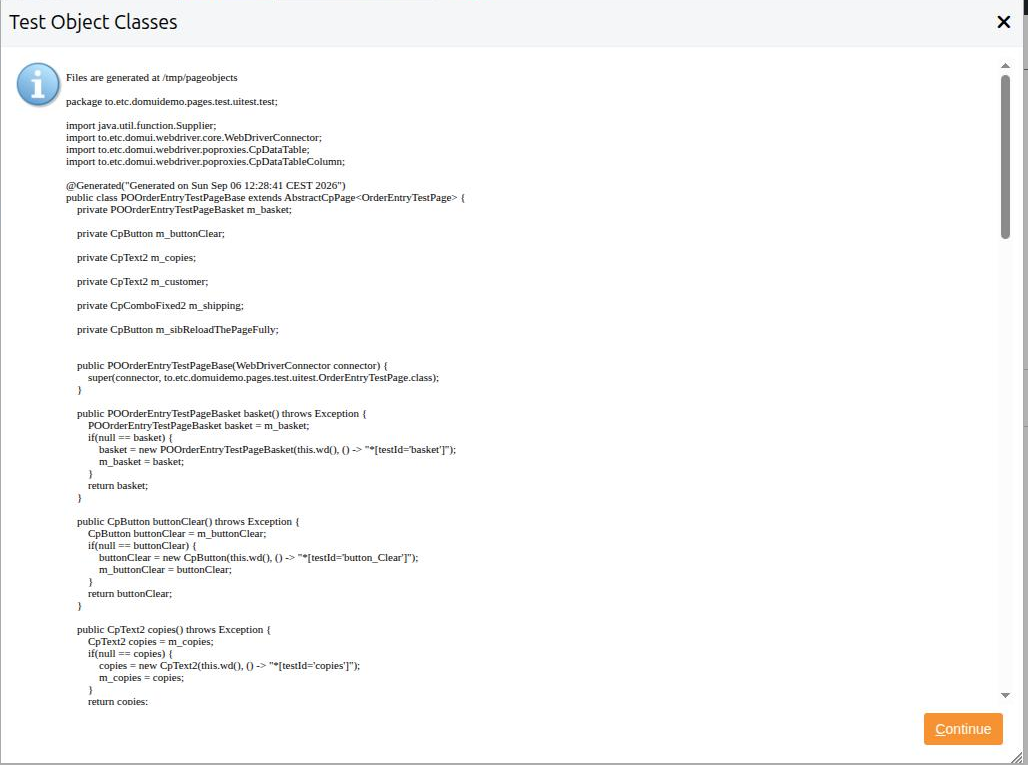
The classes are written to files as well, under /tmp/pageobjects, in
directories matching their package - so they can be copied straight into
src/test/java. That directory is emptied on every run.
The generator works from the tree that is on the screen, not from your source code. A table generates row and cell accessors only when it has rows in it, a dialog only when it is open, and a tab only when it is the tab you are looking at. Bring the screen into the state you want described, then generate.
Two things have to be true for the key to do anything:
- the application runs in development mode - that is what puts the key handler in the page;
- there is a
.developer.propertiesfile in your home directory, which is whatDeveloperOptions.isDeveloperWorkstation()answers on.
Neither is ever true in production, so the generator cannot be reached there.
What comes out
For the order entry page - a form of three controls, a DataTable with a link
button in every row, a button and a Div - the generator writes four classes
in the package to.etc.domuidemo.pages.test.uitest.test: the page's own
package plus .test.
POOrderEntryTestPageBase - the page object itself, marked @Generated:
@Generated("Generated on Sun Sep 06 12:13:35 CEST 2026")
public class POOrderEntryTestPageBase extends AbstractCpPage<OrderEntryTestPage> {
	private POOrderEntryTestPageBasket m_basket;

	private CpButton m_buttonClear;

	private CpText2 m_customer;

	...

	public POOrderEntryTestPageBase(WebDriverConnector connector) {
		super(connector, to.etc.domuidemo.pages.test.uitest.OrderEntryTestPage.class);
	}

	public CpText2 customer() throws Exception {
		CpText2 customer = m_customer;
		if(null == customer) {
			customer = new CpText2(this.wd(), () -> "*[testId='customer']");
			m_customer = customer;
		}
		return customer;
	}
	...
}
POOrderEntryTestPage - an empty subclass of it, which is where your
code goes. It is generated once as a starting point and then left alone by you
regenerating; see extending it below.
POOrderEntryTestPageBasket and POOrderEntryTestPageBaseBasketRow -
the table and its row. The table hands out columns and rows, the row hands out
what is inside the cells:
public class POOrderEntryTestPageBaseBasketRow extends CpDataTableRowBase {
	public CpDisplaySpan album() throws Exception { ...
		album = new CpDisplaySpan(this.wd(), () -> this.getCellComponentSelectorCss(0, "title"));
	}

	public CpLinkButton order() throws Exception { ...
		order = new CpLinkButton(this.wd(), () -> this.getCellComponentSelectorCss(2, "lbtn_Order"));
	}
}
The column index comes from the position of the column in the table, and the
name of the method from the column's header text (Price each becomes
priceEach()), falling back to column3 for a column with no header.
The names of everything else come from the testid: customer from the form
label, button_Clear from the button's text, lbtn_Order from the link's
text. Which is the reason to give the components a test id of your own where it
matters - the generated method is named after it.
The model it builds
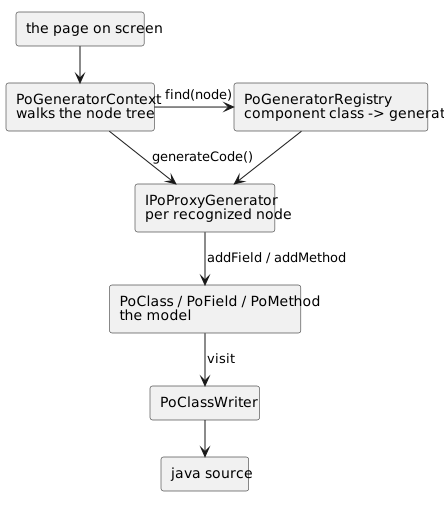
The generator does not write text: it builds a model of classes, fields and methods and then asks a writer to render Java from it. Two halves, and the seam between them is the reason a generator for a component of your own is about twenty lines.
| Class | What it is |
|---|---|
PageObjectGenerator |
the whole run: walk, prepare, generate, write |
PoGeneratorContext |
the run's state: the page, the classes made so far, the errors, and the name rules |
PoGeneratorRegistry |
which generator handles which component class |
IPoProxyGenerator |
one recognized node: acceptChildren(), prepare(), generateCode() |
IPoSelector |
how the proxy will find its element: by testid, by cell, by row |
PoClass, PoField, PoMethod, RefType |
the model of the java that will be written, imports included |
PoClassWriter |
renders the model as source |
The walk
PoGeneratorContext.createGenerators() walks the built node tree and asks the
registry for a generator for every node. What the generator answers from
acceptChildren() decides how the walk continues:
| Answer | Meaning |
|---|---|
Accepted |
this node is mine, and so is everything in it - do not walk into it |
RefusedScanChildren |
not for me; walk into my children and see what is there |
RefusedIgnoreChildren |
not for me, and there is nothing inside worth looking at |
A node that is accepted must have a testid by then, otherwise it is reported as an error in the result window and skipped. Since a testid is allocated while the page is rendered, that is another reason the generator works on a page that is on the screen.
A node that no generator claims but that is an IControl is an error too - it
says, in the window, that there is a control the generator has no proxy for.
Two passes
Everything is asked to prepare() before anything is asked to
generateCode(), so a generator that needs a class that another generator
creates cannot be tripped up by the order of the walk.
Selectors
generateCode() is handed an IPoSelector, which is what ends up inside the
lambda in the generated code:
| Selector | Generates | Used for |
|---|---|---|
PoSelectorTestId |
() -> "*[testId='customer']" |
a component on the page |
PoSelectorCell |
() -> this.getCellSelectorCss(1) |
a cell that holds nothing but text |
PoSelectorCellComponent |
() -> this.getCellComponentSelectorCss(2, "lbtn_Order") |
a component inside a cell |
PoSelectorRow |
() -> this.getRowSelector() |
the row itself |
A selector is a Supplier<String> in the generated code, evaluated on every
use, which is what lets a row proxy compute its selector from its row index.
What is recognized
| Component | Proxy generated |
|---|---|
Text2, TextArea, Input |
CpText2, CpTextArea, CpHtmlInput |
Checkbox, CheckboxButton |
CpCheckbox, CpCheckboxButton |
ComboFixed2, ComboLookup2 |
CpComboFixed2, CpComboLookup2 |
RadioGroup |
CpRadioGroup<T>, with the value of every button in it |
LookupInput2, NumberLookupControl |
CpLookupInput2, CpNumberLookupControl |
DefaultButton, SmallImgButton, LinkButton |
CpButton, CpButton, CpLinkButton |
DisplaySpan |
CpDisplaySpan |
DataTable |
a table class, a row class and a column accessor per column |
Window, Dialog and their subclasses |
a class of their own, holding what is inside the window |
PoGeneratorRegistry is the authority on this list; the superseded
first-generation controls are registered as well.
Anything else - a Div, a Span, a Table you built yourself, a component of
your own - is walked through, not generated. Its children are found, it is
not.
Extending what was generated
Your own code, in the subclass
The split between POOrderEntryTestPageBase and POOrderEntryTestPage exists
for exactly this: the Base is regenerated, the subclass is yours. When the
screen changes you generate again, copy the new Base over the old one, and
everything you wrote is untouched.
public class POOrderEntryTestPage extends POOrderEntryTestPageBase {
	private CpNodeAsText m_answer;

	public POOrderEntryTestPage(WebDriverConnector connector) {
		super(connector);
	}

	/** The answer is a plain Div, so the generator does not make a proxy for it. */
	public CpNodeAsText answer() {
		CpNodeAsText answer = m_answer;
		if(null == answer) {
			answer = new CpNodeAsText(wd(), () -> WebDriverConnector.getTestIDSelector("answer"));
			m_answer = answer;
		}
		return answer;
	}

	/** Order the album with this title, whichever row of the basket it is in. */
	public void order(String album) throws Exception {
		...
	}
}
Two kinds of thing belong here: proxies for what the generator cannot recognize, and the steps your tests speak in.
Your own component
A component of your own gets generated once you say what its proxy is. First
write the proxy - a class extending AbstractCpComponent, or
AbstractCpInputControl<T> when it holds a value:
public class CpStarRating extends AbstractCpInputControl<Integer> {
	public CpStarRating(WebDriverConnector wd, Supplier<String> selectorProvider) {
		super(wd, selectorProvider);
	}

	@Override
	public void setValue(@Nullable Integer value) {
		wd().cmd().click().on(selector(".dm-rating-star-" + value));
	}

	@Nullable
	@Override
	public Integer getValue() {
		return wd().countMatching(selectorCss(".dm-rating-on"));
	}
}
...and then register it, once, somewhere that runs before you generate - the
initialize() of your DomApplication is the obvious place:
PoGeneratorRegistry.register(StarRating.class, (ctx, node) -> new PogSimple(node, new RefType("com.example.test", "CpStarRating")));
PogSimple is the generator for "a component that is one proxy": it writes the
field, the lazy getter and the constructor call. The two-argument form taking a
name assumes DomUI's own proxy package, so a proxy of your own is named with
a RefType that carries its package.
registerExtends() registers for a class and its subclasses, which is how
every Window and Dialog is handled by one generator.
A generator of your own
When one proxy is not enough - your component contains other components, or it
needs a class of its own like DataTable does - write an
IPoProxyGenerator. AbstractPoProxyGenerator gives the two methods you
usually do not need, leaving generateCode():
public class PogStarRating extends AbstractPoProxyGenerator {
	public PogStarRating(NodeBase node) {
		super(node);
	}

	@Override
	public void generateCode(PoGeneratorContext context, PoClass into, String baseName, IPoSelector selector) throws Exception {
		RefType type = new RefType("com.example.test", "CpStarRating");
		PoField field = into.addField(type, PoGeneratorContext.fieldName(baseName));
		PoMethod getter = into.addMethod(type, baseName);
		getter.appendLazyInit(field, variable -> {
			getter.append(variable).append(" = new ");
			getter.appendType(into, type).append("(this.wd(), ").append(selector.selectorAsCode()).append(");").nl();
		});
	}
}
addField and addMethod take care of the import, appendLazyInit writes the
"make it once" body around what you append, and context.addClass() makes a
whole new class when your component needs one. PogDataTable is the worked
example of all of it: it detects the columns from the rendered THEAD, the
content of the cells from the rendered rows, and generates three classes.