
Running the tests
mvn21 verify -pl to.etc.domui.demo
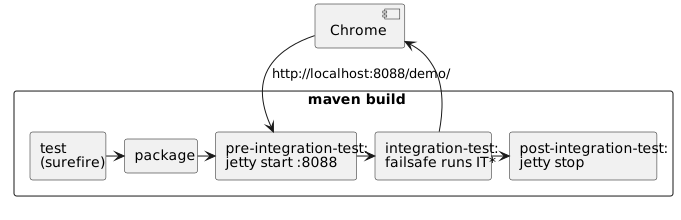
That is the whole thing: maven builds the module, starts a jetty with the demo web application on it, runs every UI test against that jetty, and stops it again.
- Two kinds of test
- What starts, and where the test finds it
- The browser and its driver
- Test properties
- Running one test from the IDE
- When a test fails
Two kinds of test
| Class name | Plugin | When it runs | Needs |
|---|---|---|---|
Test* |
surefire | mvn test, during the normal build |
nothing |
IT* |
failsafe | mvn verify, after the application is packaged |
a browser and a driver |
The split is what makes the UI tests bearable: they are slow and they need a
browser, so they stay out of mvn test and of every build that stops before
the integration-test phase. A build that goes all the way - verify or
install - runs them, and -DskipTests skips them along with the rest.
What starts, and where the test finds it
The jetty maven plugin is bound to pre-integration-test and post-integration-test
in the demo's pom, and failsafe is told where the application then is:
| Property | Value | Meaning |
|---|---|---|
webdriver.url |
http://localhost:8088/demo/ |
the base URL the tests open pages on |
webdriver.hub |
chrome |
the browser: headless Chrome, on this machine |
domui.testui |
true |
the server renders testid attributes |
openScreen(SomePage.class) builds its URL from webdriver.url plus the fully
qualified class name of the page, so nothing in a test names a host or a port.
The browser and its driver
webdriver.hub says which browser, and where it runs: browser@destination,
with the destination left off meaning this machine.
| Value | What you get |
|---|---|
chrome |
headless Chrome - the default, and what the build uses |
chrome-desktop |
a Chrome you can watch the test drive |
firefox |
Firefox |
chrome@http://somehost:4444/wd/hub |
a remote Selenium hub |
Chrome has to be installed; the chromedriver does not. On the first local Chrome test the framework asks WebDriverManager for the driver that matches the installed Chrome, which downloads and caches it - so a machine with Chrome and a network connection needs no further preparation.
To use a driver of your own instead, name it in webdriver.chrome.driver; the
paths /usr/local/bin, /usr/bin, ~/bin and ~ are searched as well.
Chrome itself is looked for in /usr/local/bin/google-chrome,
/usr/bin/google-chrome and /Applications/Google Chrome.app, or wherever
webdriver.chrome.executable says.
Test properties
Everything above is read through TestProperties, which looks at the JVM's
system properties first and at a properties file second. The file is
~/.test.properties unless VPTESTCFG or -DtestProperties= names another
one. So a property set with -D on the command line always wins:
mvn21 verify -pl to.etc.domui.demo -Dwebdriver.hub=chrome-desktop
| Property | Default | What it does |
|---|---|---|
webdriver.url |
- | required: the base URL of the application under test |
webdriver.hub |
chrome |
browser and destination |
webdriver.waittimeout |
60 | how many seconds a wait keeps trying |
forcelocale |
- | a language tag; the browser asks for that locale |
webdriver.chrome.driver |
downloaded | the chromedriver binary to use |
webdriver.chrome.executable |
searched | the Chrome binary to use |
Running one test from the IDE
Failsafe's jetty is not there when you press Run in the IDE, so start one yourself and point the test at it:
mvn21 jetty:run -pl to.etc.domui.demo # http://localhost:8088/demo/
and run the test with -Dwebdriver.url=http://localhost:8088/demo/ (plus
-Dwebdriver.hub=chrome-desktop if you want to watch it). The jetty plugin is
configured with domui.testui=true, so the pages it serves carry their
testids.
When a test fails
Every failing UI test writes a screenshot of the browser at the moment it failed:
to.etc.domui.demo/target/failsafe-reports/ITOrderEntry_orderingSaysWhatWasOrdered.png
That is usually enough to see what went wrong - a dialog that was still open, a
field that was never filled, an error message the test did not expect. A test
can also take one itself with snapshot("before ordering").
Chrome does not take a full-page screenshot through the WebDriver protocol: it captures the viewport only. DomUI works around that with a Chrome-specific screenshot helper, which is also what makes rendering tests possible.