
Writing a UI test
A UI test is an ordinary JUnit test that happens to have a browser attached. It opens a page, does what a user would do, and asserts on what the browser ends up showing.
- A test
- What the test is made of
- Finding things: the testid
- Where a testid comes from
- Doing things: the command builder
- Looking at things
- Waiting
- Next
A test
public class ITOrderEntry extends AbstractWebDriverTest {
	/** The Order link of the second row of the basket. */
	static private final By ORDER_REVOLVER = By.cssSelector("*[testid='basket'] tbody tr:nth-child(2) a");

	@Test
	public void orderingSaysWhatWasOrdered() throws Exception {
		wd().openScreen(OrderEntryTestPage.class);

		wd().cmd().type("Ozymandias").on("customer", "input");
		wd().cmd().click().on(ORDER_REVOLVER);

		Assert.assertEquals("Ozymandias ordered 1 x Revolver, Standard, total 16.45", wd().getText("answer"));
	}

	@Test
	public void anEmptyCustomerStopsTheOrder() throws Exception {
		wd().openScreen(OrderEntryTestPage.class);

		wd().cmd().click().on(ORDER_REVOLVER);

		//-- The mandatory customer field reports itself, and the handler never got past it.
		Assert.assertTrue("The customer field should be marked as being in error",
			wd().getAttribute("customer", "class").contains("ui-input-err"));
		Assert.assertEquals("Nothing ordered yet", wd().getText("answer"));
	}
}
The page it drives is OrderEntryTestPage in the demo application - a form, a
basket, and an answer that changes when something is ordered:
Press an Order link with the customer field empty and the mandatory field reports itself, exactly as the second test asserts.
What the test is made of
AbstractWebDriverTest gives one thing: wd(), a WebDriverConnector. The
connector is a wrapper around Selenium's WebDriver that knows about DomUI -
about testids, about the fact that a click causes an AJAX round trip that has
to finish before the next assert can look at the page.
Each test method gets a fresh connector state: cookies are deleted between
tests, so a test never inherits a login or a conversation from the one before
it. When a test needs the same screen for all its methods, extend
AbstractSinglePageWebDriverTest instead and open the screen in the
initializeScreen() method it makes you implement.
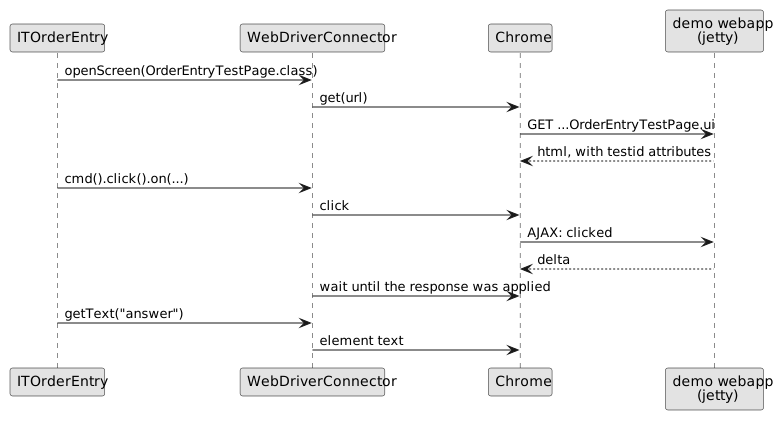
The class name matters: a test whose name starts with IT is run by failsafe,
after the web application has been started. See
running the tests.
Finding things: the testid
Selectors like div > table > tbody > tr:nth-child(2) break the moment a
designer adds a wrapper. DomUI therefore renders a testid attribute on
nodes, and tests address elements by that:
wd().cmd().type("Ozymandias").on("customer", "input");     // testid, plus the tag inside it
String answer = wd().getText("answer");                    // by testid
By b = wd().byId("customer");                              // *[testid='customer']
A control is a div with an input inside it, so on("customer", "input")
means "the input inside the component whose testid is customer".
The attribute is only rendered when the application runs in UI test mode.
That is on when domui.testui=true is set (failsafe and the jetty plugin
both set it for the demo), and on by default in development mode.
Where a testid comes from
Either you set it, or DomUI calculates one:
Text2<String> customer = new Text2<>(String.class);
customer.setTestID("customer");                     // explicit: rendered as it is
...and when nothing was set, the component asks itself what it should be called. The calculated ids are predictable:
| Component | Calculated testid | From |
|---|---|---|
| any control on a form | customer |
the form builder, from the label, lowercased |
DefaultButton |
button_Clear |
the button text |
LinkButton |
lbtn_Order |
the link text |
SmallImgButton |
sib_Reload_the_page_fully |
the title |
RadioButton |
rb-Express |
the button's value |
DataTable |
dt_1 |
a counter |
Two components that end up with the same name get a _1, _2 suffix, in the
order they were built.
The order entry page above sets a testid on two nodes only - the basket and the answer - and lets the three form controls, the link buttons and the Clear button name themselves.
A calculated id is a convenience, not a contract: change a button's text and its testid changes with it, and the test that used it stops finding it. Set the id yourself on everything a test must not lose sight of.
Inside a repeating structure
A row of a DataTable is a repeating structure, so every calculated id
inside it is prefixed with the row's repeat id:
<a testid="/r0/lbtn_Order">Order</a>       <!-- row 0 -->
<a testid="/r1/lbtn_Order">Order</a>       <!-- row 1 -->
An id you set yourself is left alone - the two display columns of the basket
render testid="title" and testid="price" in every row. Addressing a
component in a table by hand is therefore awkward, which is what
page objects are for.
Doing things: the command builder
wd().cmd() builds one action and ends with on(...), which says where it
lands:
wd().cmd().type("Ozymandias").on("customer", "input");   // type into it
wd().cmd().click().on("button_Clear");                   // click it
wd().cmd().check(true).on("agreed");                     // tick a checkbox
wd().cmd().clickable().timeout(5000).click().on(b);      // wait for it first
present(), visible(), invisible() and clickable() are conditions that
must hold before the action is done; timeout() and interval() change how
long the connector keeps trying. The default is a 60 second timeout with a
250ms interval, and it is reset for every test.
Looking at things
| Call | Answers |
|---|---|
getText(testid) |
the text inside the element |
getValue(testid) |
the value of an input |
getAttribute(testid, name) |
one attribute - class to check for an error state |
isPresent(testid), isVisible(testid) |
whether it is in the DOM / shown |
isEnabled, isEditable, isChecked |
the state of a control |
countMatching(css) |
how many elements match |
screenInspector() |
the pixels; see rendering tests |
Waiting
The connector waits by itself after an action that causes a round trip, so most tests need no waiting at all. When something is slower than a round trip - a query, an asynchronous component - say what you are waiting for:
wd().wait(wd().byId("results"));                       // until it is there
wd().waitForElementVisible("results");                 // until it is shown
wd().notPresent("busy");                               // until it is gone
waitForRefreshOf(page.basket(), Duration.ofSeconds(5), () -> page.buttonClear().click());
waitForRefreshOf runs the action and then waits until that element has been
replaced by the server's answer, which is the honest way to wait for a piece of
screen to be rebuilt.
Next
The test above works, but the two selectors at the top of it are the beginning of a problem: they describe the html of a screen inside a test that should be about ordering an album. Page objects put them where they belong.