
Use the "example" skeleton to create a new application
- Getting it running
- The three modules
- The AppFilter: how a request becomes a page
- The Application class
- The database
- Login and rights
- Where to go from here
The skeleton is a working DomUI application with nothing in it. It is the fastest way to a new program: clone it, rename it, and start adding pages to something that already has a database, a login and a build.
It lives in its own repository, fjalvingh/domui-skeleton, and it includes DomUI itself as a git submodule, so a clone gives you the framework and the application together.
Getting it running
$ git clone --recursive https://github.com/fjalvingh/domui-skeleton petshop
$ cd petshop
$ mvn clean install -DskipTests -Dmaven.javadoc.skip=true
The --recursive is what pulls in the DomUI submodule; without it the build has
nothing to compile against. You need Java 21 and Maven 3.9 or newer. The
build takes about twenty seconds and builds DomUI and the application in one
reactor.
Then run it:
$ cd app-web
$ mvn jetty:run
and open http://localhost:8082/ui/. You get a login screen; log in with admin@example.com, password admin, and you land on a page with a single link to the user maintenance screen.
No database setup was needed for any of that. The application noticed it has no database configured, created an HSQLDB one in a temporary directory, created the tables in it and filled them with three users. Configuring a real database is described below.
The three modules
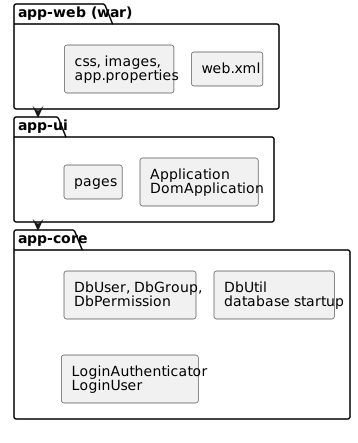
- app-core holds everything that is not user interface: the entities, the code that starts the database, and the authenticator. Nothing in it imports a DomUI page.
- app-ui holds the
DomApplicationsubclass and the pages. - app-web is the war assembly:
web.xml, the stylesheet, the images, and the configuration file. It has no Java code of its own.
Splitting it this way is a suggestion, not a requirement, but it is worth keeping: it stops business logic from quietly growing a dependency on the screen it happens to be used by. Adding a fourth module is just Maven.
To make the skeleton yours, rename the four Maven artifacts and the my.domui.app
package, and change Constants - it holds the application code, title and motto
that the rest of the code reads.
The AppFilter: how a request becomes a page
All of DomUI hangs off a single servlet filter, declared in
app-web/src/main/webapp/WEB-INF/web.xml:
<filter>
    <filter-name>DomFilter</filter-name>
    <filter-class>to.etc.domui.server.AppFilter</filter-class>
    <init-param>
        <param-name>application</param-name>
        <param-value>my.domui.app.ui.Application</param-value>
    </init-param>
    <init-param>
        <param-name>extension</param-name>
        <param-value>ui</param-value>
    </init-param>
    <init-param>
        <param-name>auto-reload</param-name>
        <param-value>ui.pages.*, ui.component.*, .*\.component[s?]\..*, .*\.pages\..*</param-value>
    </init-param>
</filter>
<filter-mapping>
    <filter-name>DomFilter</filter-name>
    <url-pattern>/*</url-pattern>
</filter-mapping>
There is one filter and it is mapped to /*. There are no servlets, and there is
nothing to add to web.xml when you add a page.
The three parameters:
- application names your
DomApplicationsubclass.AppFilterinstantiates it once and calls itsinitialize(); that class is the application-level singleton where everything else gets configured. - extension is the suffix that marks a URL as a page. A page's URL is its
fully qualified class name plus that suffix, so
my.domui.app.ui.pages.login.LoginPageis served at/ui/my.domui.app.ui.pages.login.LoginPage.ui.uiis the default. - auto-reload lists class name patterns that DomUI watches while you develop. When a class matching one of them changes on disk, DomUI throws away its class loader and reloads it, so an edited page is live on the next click without a redeploy.
auto-reload only does anything on a developer workstation: DomUI checks for
a .developer.properties file in your home directory and skips all of this
when there is none. A deployed application never reloads, whatever web.xml
says.
Requests that are not a page URL still pass through the filter, but you write no
code for them. DomUI serves what it owns - it compiles css/appstyle.scss to css
on the way out, and it serves resources that live inside jars, which is how the
icon set gets its stylesheet and fonts - and it lets the container serve the rest
straight from src/main/webapp.
The Application class
my.domui.app.ui.Application extends DomApplication, and its initialize() is
where the application is wired together. Reading it top to bottom tells you what
the skeleton actually sets up:
public class Application extends DomApplication {
	@Nullable @Override public Class<? extends UrlPage> getRootPage() {
		return HomePage.class;
	}

	@Override protected void initialize(@NonNull ConfigParameters pp) throws Exception {
		//-- Redirect all JUL logging to slf4j
		LogManager.getLogManager().reset();
		SLF4JBridgeHandler.removeHandlersForRootLogger();
		SLF4JBridgeHandler.install();

		setShowProblemTemplate(true);
		setThemeFactory(SassThemeFactory.INSTANCE);
		addHeaderContributor(HeaderContributor.loadStylesheet("css/appstyle.scss"), 10);
		addHeaderContributor(new FaviconContributor("img/favicon.ico"), 100);

		//-- Read the config file, then start the database
		File propertyFile = getPropertyFile();
		Properties properties = getProperties(propertyFile);
		initializeDatabase(propertyFile, properties);

		//-- Login
		LoginAuthenticator loginAuthenticator = new LoginAuthenticator();
		defineLoginAndLoginPage(loginAuthenticator);
	}
}
getRootPage() is what the application's root URL shows - HomePage here, so
http://localhost:8082/ui/ is that page. The stylesheet added as a header
contributor is css/appstyle.scss; it is compiled by DomUI's sass support, and
so is the theme selected by SassThemeFactory. Icons need no line here at all:
the skeleton has the fontawesome6free artifact as a dependency, and DomUI
registers an icon pack that is on the classpath by itself.
Where the configuration file comes from
getPropertyFile() looks for the file called app.properties - app being
Constants.APPCODE - in this order:
- the file named by the
configsystem property, if that is set; ~/.app/app.properties;~/app.properties;WEB-INF/app.propertiesinside the war.
It fails loudly when it finds nothing. The order is deliberate: the file in the
war is the one you commit, and the ones in the home directory are how a developer
or a server overrides it without changing the deployment. The name itself can be
overridden by putting domui.app.config=someothername.properties in your
.developer.properties.
The database
Database startup lives in app-core, in DbUtil, and is three separate things
that happen in a fixed order:
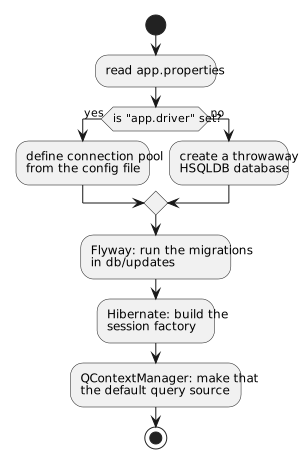
The connection pool. DomUI has its own
pool (to.etc.dbpool). It is
configured from the same app.properties that configures the rest of the
application: a pool has an id, and every property of that pool is named
<poolid>.<property>. The pool id is the application code, so:
app.driver=org.postgresql.Driver
app.url=jdbc:postgresql://localhost:5432/domui_app
app.userid=someuser
app.password=somepassword
Those four lines are the whole database configuration. As long as app.driver is
absent - as it is in the file the skeleton ships - DbUtil builds a throwaway
HSQLDB database instead, which is why the application runs straight after a
clone.
The schema. DbUtil.updateDatabase() runs Flyway
over app-core/src/main/resources/db/updates:
Flyway.configure()
	.dataSource(ds)
	.locations("db/updates/common", "db/updates/" + dbtype.name())
	.schemas("PUBLIC")
	.callbacks(new MigrationLogger())
	.load()
	.migrate();
db/updates/common holds the scripts that work on every database, and
db/updates/<type> the ones for a specific one - type being the
SystemDatabaseType that DbUtil.initialize() passes in, which is postgres
as the skeleton stands. Change that call when you target something else. The
skeleton ships a single V1__create_database.sql in common, which creates the
four tables the login uses and seeds three users. You extend the schema by adding V2__...sql,
V3__...sql next to it; Flyway records what it has run and applies only what is
new, at every application start.
Hibernate. HibernateConfiguration lists the entity classes and DbUtil
starts the session factory on the pool:
public static void configure() {
	HibernateConfigurator.addClasses(DbGroup.class);
	HibernateConfigurator.addClasses(DbGroupMember.class);
	HibernateConfigurator.addClasses(DbPermission.class);
	HibernateConfigurator.addClasses(DbUser.class);
}
Every entity you add needs a line here. The last step registers that Hibernate
setup as the default for QCriteria, which is
what makes getSharedContext() on a page return a working QDataContext without
any page having to know where it came from.
The tables are created by the Flyway script, not by Hibernate. The entity annotations and the SQL have to agree, and nothing checks that for you at build time - it fails when the query runs. Change both, together.
Login and rights
Three pieces do the work, and they are independent of each other.
Who is allowed in is LoginAuthenticator in app-core, an
ILoginAuthenticator. Its main method takes a user id and a password and returns
an IUser, or null:
@Nullable @Override
public IUser authenticateUser(@Nullable String uid, @Nullable String pw) throws Exception {
	QDataContext dc = QContextManager.createUnmanagedContext();
	try {
		DbUser p = dc.queryOne(QCriteria.create(DbUser.class).eq("email", uid));
		if(p == null)
			return null;
		if(pw != null && !isEncryptedPasswordCorrect(p.getPassword(), pw))
			return null;
		return new LoginUser(dc, p);
	} finally {
		dc.close();
	}
}
Passwords are stored as salt;hash, PBKDF2 with HMAC-SHA512 over a 20 byte
random salt. getEncyptedPassword() produces that format and is what the user
edit page calls when a password is changed. Replace the whole class if your users
live in LDAP or behind single sign-on - nothing else in the application looks at
DbUser.password.
Who the user is is LoginUser, an IUser2. It is built once at login and
kept in the session. Its constructor walks the user's groups and flattens every
permission it finds into a set, so the rights check is a set lookup rather than a
query:
@Override
public boolean hasRight(@NonNull String r) {
	return m_permissionNameSet.contains(r) || m_permissionNameSet.contains(Rights.ADMIN);
}
The four tables behind that are au_user, au_group, au_group_member and
au_group_permission: a user is in groups, a group has named permissions, and a
permission name is just a string. Rights holds those names as constants, and
admin is treated as "may do everything".
Where the rights are demanded is the @UIRights annotation, on the page:
@UIRights                       // any logged-in user
public class HomePage extends UrlPage { ... }

@UIRights(Rights.ADMIN)         // only users with the "admin" permission
public class UserListPage extends AbstractListPage<DbUser> { ... }
That annotation is the entire access control story for a page. With several rights listed the user needs at least one of them.
What happens when a page needs a login
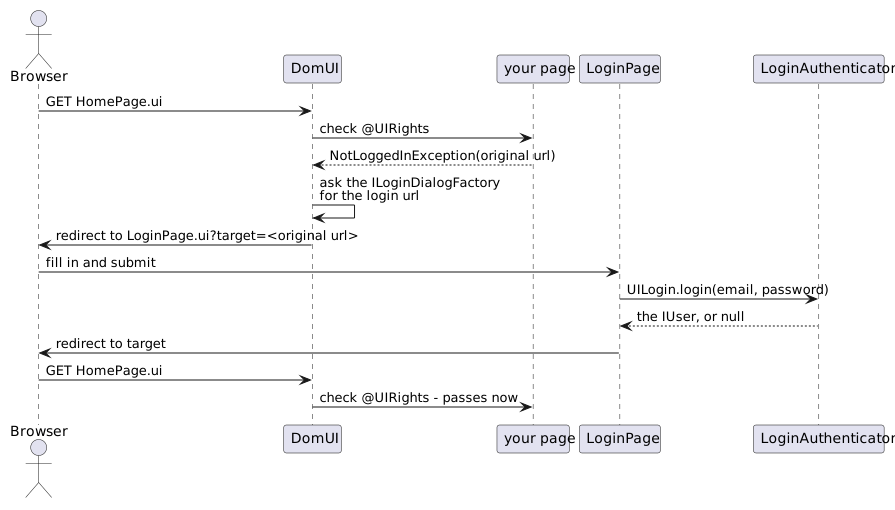
DomUI raises NotLoggedInException and needs to be told which page to send the
user to. That is the second half of defineLoginAndLoginPage():
setLoginAuthenticator(loginAuthenticator);
setLoginDialogFactory(new ILoginDialogFactory() {
	@NonNull @Override public String getLoginRURL(String originalTarget) {
		StringBuilder sb = new StringBuilder();
		sb.append(LoginPage.class.getName() + ".ui?target=");
		StringTool.encodeURLEncoded(sb, originalTarget);
		return sb.toString();
	}

	@Nullable @Override public String getAccessDeniedURL() {
		return null;                    // use the built-in access denied page
	}
});
The factory gets the URL the user was trying to reach and returns the URL to send
them to instead, with that original target encoded in it. LoginPage is an
ordinary DomUI page with no annotation - it must be reachable by someone who is
not logged in - and the only framework call in it is:
if(m_failcount > 10 || !UILogin.login(email, pw)) {
	error(errorContainer, "Invalid login");
	m_failcount++;
	...
} else {
	String tgt = getPage().getPageParameters().getString("target");
	UIGoto.redirect(tgt == null ? "" : tgt);
}
UILogin.login() calls your authenticator and, when it returns a user, puts that
user in the session. Everything after that - @UIRights, UIContext.getCurrentUser(),
LoginUser.getCurrent() - reads it from there. Because the login screen is your
page rather than the framework's, changing how it looks is just editing
LoginPage.
The framework counts failures per user id: after ten failed attempts within five
minutes login() returns false for that id even when the credentials are right,
until the five minutes have passed. DefaultLoginHandler holds both numbers, and
an application that wants other ones - or another way of counting - implements
ILoginHandler itself. The m_failcount in the code above is the page's own
counter, and does not replace this.
A user with the right to do so can work as somebody else:
UILogin.impersonateByLoginId(id) authenticates that user without a password and
makes them the current user, so everything reading the current user - rights
included - sees the impersonated one. It throws unless the real user's
IUser.canImpersonate() says yes. UILogin.getRealUser() gives the user behind
the impersonation, and UILogin.impersonate(null) ends it.
Impersonating hands the impersonator every right the impersonated user has.
canImpersonate() returns false by default; keep it that way for anyone who
does not need it.
The three users the migration script creates are for getting started only.
Delete them from V1__create_database.sql, or add a later migration that
removes them, before this goes anywhere real.
Where to go from here
The user maintenance screens are worth reading before you write your own:
UserListPage and UserEditPage are small, and between them they show a
search page, a list, an edit form and a save, in the shape the rest of your
application can follow.