
Themes
A theme is a directory of SCSS with a style.scss in it. DomUI ships one,
winter. An application has exactly one theme, and it is chosen once, during
initialization, by handing DomApplication the factory that builds it:
setThemeFactory(SassThemeFactory.INSTANCE);
That is all most applications ever do with themes. It cannot be changed afterwards, and there is no way to have two themes in play at the same time.
What can differ from session to session is the theme's colour scheme - the theme's variant. A scheme is light or dark, and the winter theme comes with six of them.
Colour schemes
Every variant of the theme is a colour scheme of a nature, light or dark, and is
named for both: light-winter, dark-nord. The winter theme ships these, as constants
of SchemeVariant:
| Variant | Constant | What it looks like |
|---|---|---|
light-winter |
WINTER |
DomUI's light theme |
dark-midnight |
MIDNIGHT |
deep indigo grounds, electric blue structure, neon accents (after Tokyo Night) |
dark-darcula |
DARCULA |
neutral greys with muted colours (after IntelliJ's Darcula) |
dark-lagoon |
LAGOON |
deep sea-green grounds with vivid teal structure |
dark-violet |
VIOLET |
aubergine grounds, violet structure, pink and cyan accents (after Dracula) |
dark-nord |
NORD |
arctic blue-grey grounds, frost blue structure: the calm one |
The theme review page in the demo shows every component in one go, in whichever scheme you pick from the bar at its top:
Set a scheme on the request context and it holds for the rest of the session:
UIContext.getRequestContext().setThemeVariant(SchemeVariant.NORD);
The stylesheet link is written by the full page renderer, so after switching the
page has to be reloaded for the new sheet to arrive. The demo does that with
appendJavascript("WebUI.refreshPage();"), which keeps the conversation and so
keeps whatever the user had typed. The sun/moon button at the top right of every demo
page is the whole of a dark/light switch - see ThemeVariantSwitch in the demo source.
The schemes an application offers
getThemeVariants() in DomApplication returns the schemes a user can choose from, in
the order they are offered - it is what a scheme picker shows, with each one's
getLabel(). By default it is the theme's own list, the six above. Override it to leave
some out, or to add schemes of your own:
static private final IThemeVariant OCEAN = new SchemeVariant(ThemeNature.DARK, "ocean", "Ocean");

@Override
public List<IThemeVariant> getThemeVariants() {
	return List.of(SchemeVariant.WINTER, OCEAN, SchemeVariant.NORD);
}
The order means something: the first light scheme is the default, the one a session
gets when nothing chose another (getDefaultThemeVariant()), and the first scheme of each
nature is what a browser that prefers that nature gets (see below).
A scheme that is not in the list is not recognised. A session, a cookie or a URL that names one - an old name, a scheme the application stopped offering, a name made up - gets the default instead of an error.
Keeping the choice
To keep the choice for the sessions after this one too, name a cookie for it in
your DomApplication.initialize():
setThemeVariantCookieName("myapp-theme-variant");
Now press the switch, close the browser, come back: the page is still the way you left it. The name is yours to choose, and there is no default, because every application on a host would otherwise read the same cookie and a choice made in one would carry into all the others. Without a name there is no cookie: the choice lasts as long as the session, and the browser is not asked for its preference either (see below), because the answer could not be kept.
The first visit
A user who has not chosen anything yet gets the nature their desktop is set to. The preference lives in the browser and the theme is a server side stylesheet, so DomUI asks for it in the one place where the two meet - a script at the top of the page head, before the stylesheet the browser is about to fetch:
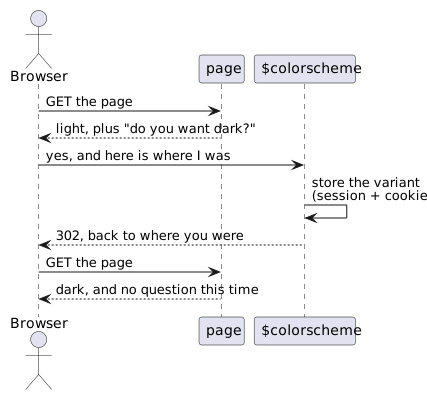
Because the script leaves before the stylesheet is fetched, nothing has been painted yet: the user sees the page they wanted, not a flash of the other one.
The question is only put to a browser that has nothing stored, so it is asked once
and then never again - and pressing the switch answers it too. It is not asked at
all by an application without a theme cookie, since it could not keep the answer.
What each answer means is getThemeVariantForColorScheme() in your DomApplication:
the first scheme of that nature in getThemeVariants() - so for the winter theme a dark
desktop gets Midnight. An application that offers no dark scheme gets null there, and
the question is not asked.
To decide the scheme per user instead - from a preference stored with the account,
say - override calculateUserThemeVariant() in your DomApplication. It is asked
when neither the session nor the cookie holds a choice, so switch the browser
question off as well (setColorSchemeDetection(false)) or it will overrule what you
return:
@Override
public IThemeVariant calculateUserThemeVariant(IRequestContext ctx) {
	return userPrefersDark(ctx) ? SchemeVariant.MIDNIGHT : super.calculateUserThemeVariant(ctx);
}
Sessions that get through all of that without a scheme render in the default, the first light one.
Where a theme file comes from
The style, the nature and the scheme become a search path, the same for every scheme, tried in order until a file is found:
| Order | Path | Holds |
|---|---|---|
| 1 | $themes/scss/<style>/<nature>/<scheme> |
the scheme: _scheme.scss |
| 2 | $themes/scss/<style>/<nature> |
the nature: its _palette.scss (light or dark), and its images |
| 3 | $themes/scss/<style> |
everything else: every rule of the theme, the component colours |
| 4 | $themes/scss/all |
what all themes share |
Because the first directory that has a file wins, a scheme or a nature overrides exactly what it wants to and inherits the rest. No rule of the theme is repeated anywhere; what differs is the colours, and a few images:
themes/scss/winter/                          style.scss, every component's partial, _component-colors.scss
themes/scss/winter/light/_palette.scss       the light nature: $color-scheme, and the scheme's roles passed on
themes/scss/winter/light/*.png, *.gif        the images that differ between light and dark
themes/scss/winter/light/winter/_scheme.scss the light scheme "winter"
themes/scss/winter/dark/_palette.scss        the dark nature, the same way
themes/scss/winter/dark/*.png, *.gif         the same images, made for a dark page
themes/scss/winter/dark/midnight/_scheme.scss
themes/scss/winter/dark/nord/_scheme.scss
...
A scheme is one file
A scheme is the theme's colour roles, and nothing else: 97 colours, each named for what it is for - a surface, a kind of text, an intent - and never for the component that paints it. Every scheme states the same set, light or dark:
// themes/scss/winter/dark/nord/_scheme.scss
$surface-page: #2e3440;
$surface-raised: #343b49;
$text-default: #dee3ec;
$text-subtle: #b0b9c8;
$border-default: #434c5e;
$control-solid: #88c0d0;
$control-on-solid: #2e3440;
$danger-wash: #483d48;
$danger-text: #f0a0a7;
...
A role is named $<family>-<step>. The families without a colour of their own:
| Family | Roles | For |
|---|---|---|
surface |
-page, -raised, -overlay, -sunken, -band, -inverse |
what things stand on: the page, a panel on it, what floats (a popup, menu or window), something recessed (a gutter, a code block), a strip one step off its surface (a table header band, an alternate row), a dark spot in a light theme |
text |
-default, -strong, -subtle, -faint, -inverse |
body text, emphasis and labels, secondary text and hints, a placeholder or another month's day, text on the inverse surface |
border |
-subtle, -default, -strong, -bold |
from a divider, through the edge of a panel and a line with weight, to a hard frame |
field |
-surface, -surface-readonly, -border, -border-hover |
inputs |
link |
-text, -text-visited, -text-hover |
links |
| states | $hover-wash and -border; $selected-wash, -solid, -on-solid, -border; $highlight; $focus-ring; $disabled-surface, -text, -border; $scrim; $shadow |
what applies to anything: under the pointer, selected, marked or found, keyboard focus, disabled, the veil behind a modal, what shadows are made of |
Selection has a hue no other role uses - a magenta in DomUI's schemes - so a selected row can never be taken for a hovered, marked, informative or erroneous one.
Eight colour families have the same six steps:
| Family | Means |
|---|---|
primary |
the theme's accent: the default action |
control |
the normal colour of a control in use: a toggle that is on, the chosen item of a choice, a chip of a chosen value, a breadcrumb, a pager's buttons |
neutral |
an ordinary action, a plain title bar, a quiet fill |
info |
information, guidance |
success |
it worked, it is allowed |
warning |
caution, before a mistake |
danger |
an error, a destructive action |
chrome |
the application's frame: tab strips, tabs, table headers, headings |
| Step | What it is | Its promise |
|---|---|---|
-wash |
the lightest tint: the ground of a message, an input in error | the family's -text and $text-default reach 4.5:1 on it |
-tint |
clearly coloured, still light: a tag, a label, a marked day | $text-strong reaches 4.5:1 on it |
-solid |
the full colour: a button, a flare, a badge | - |
-on-solid |
text and icons on -solid |
4.5:1 on it |
-text |
text in this family on an ordinary surface | 4.5:1 on the page and on its wash |
-border |
a border, an accent bar or a marker | decoration next to text that says the same |
So $danger-wash is the ground of an error message, $danger-text its text, and
$danger-solid with $danger-on-solid an error flare. The hover and pressed shades of a
-solid are not roles: the theme works them out from it. Last come seven categories,
$category-1-solid/-wash to $category-7-...: colours with no meaning, for things that only
have to be told apart, like the levels of a nested ConditionPanel. They are numbered, not named
after a hue, so that a scheme picks its own; neighbours differ most.
Every scheme DomUI ships keeps those promises, and a test (TestThemeContrast) holds it to
them: a new scheme is a copy of one of DomUI's with the colours changed, and it deserves the
same test.
The nature's _palette.scss decides very little. It says what the browser paints its own
canvas and scrollbars in ($color-scheme: dark), and passes the scheme's roles on, each
!default:
// themes/scss/winter/dark/_palette.scss
$color-scheme: dark !default;
$surface-page: s.$surface-page !default;
$text-default: s.$text-default !default;
...
That !default is what lets an application still set any role: an application's
_custominit.scss wins over every scheme.
Where a colour is named
Colours live in two tiers.
The roles are the scheme's, above. Component colours are in
_component-colors.scss: one variable per colour a component paints, each defaulting to a
role. There is one copy of this file, for every scheme of both natures:
//-- TabPanel (.ui-tab-*)
$tab-hdr-bg: $chrome-wash !default;
$tab-bg: $chrome-tint !default;
$tab-color: $text-strong !default;
A component's own stylesheet reads its own variables, or a role directly - never a literal:
.ui-tab-hdr ul {
	background: $tab-hdr-bg;
}
That indirection is the point. An application restyles one component by setting one component colour, or the whole theme by setting a role, and a scheme redresses everything through its roles; none of them has to edit a component.
Exceptions
A component colour that one nature, or one scheme, wants different from what
_component-colors.scss gives it is an exception: a plain declaration, like an
application's _custominit.scss, in a file the search path finds:
| File | For |
|---|---|
<nature>/_nature-exceptions.scss |
every scheme of that nature |
<nature>/<scheme>/_scheme-exceptions.scss |
that one scheme, outranking the nature's |
Neither nature, and none of DomUI's schemes, has any: every component colour is its role in
every scheme. The files are there, empty, for a scheme of your own that needs one. An
application's _custominit.scss and _variant-custominit.scss outrank both;
_theme-configuration.scss gathers all four into what the theme is configured with.
An application stylesheet that reads the theme with @use "theme" as t; gets the same
values the page shows, custominit files included: DomUI configures the theme for it the way
style.scss does, before the sheet itself is loaded.
Things that nest
A component whose levels nest - a submenu inside a submenu - states each level as a
variable of its own: $pmnu-bg, $pmnu-sm1-bg, $pmnu-sm2-bg, $pmnu-sm3-bg, each a role
further off the menu than the one before, rather than walking a scale that would have to mean something
different in each nature.
Images
An image that does not read on both natures has a copy with the same name in light/
and in dark/. The dark copies are not drawn by hand: buildResources/dark-theme-images.sh
in the DomUI source makes them from the light images, turning their lightness around while
keeping their colours, so a changed image is a re-run of the script. A
THEME/btn-datein.png in Java, or a url() in a stylesheet, gets the copy of the
session's nature; every other image comes from the theme directory, the same for all. An
image that must be there before anything can be loaded is no image at all: the sort arrows
of a table header and the spinner of the "waiting for the server" message are drawn by
css, in the scheme's colours.
A partial that still writes a colour literally cannot be redressed by a scheme - so when
you find one, give it a variable rather than overriding it. An application stylesheet can
read the theme's roles with @use "theme" as t; - which is what the demo's
css/_darkstyle.scss does for its own colours, inside a branch on t.$color-scheme.
The parameters module holds the variant's name as well,
and its parts: $themeVariant (dark-nord), $themeNature (dark), $themeScheme
(nord).
The $ on the front of $themes makes DomUI's resource resolver handle the
name, and it looks in four places, in this order:
- a file in the webapp directory -
<webapp>/themes/scss/winter/style.scss - in development mode,
META-INF/resources/themes/...on the classpath, reloaded when it changes - a resource served by the servlet container
- the classpath, under
/resources/- which is where DomUI's own theme lives
An application file therefore wins over the framework's, and that is the hook the whole of overriding the theme hangs on - and how an application adds a scheme of its own.
How the stylesheet reaches the browser
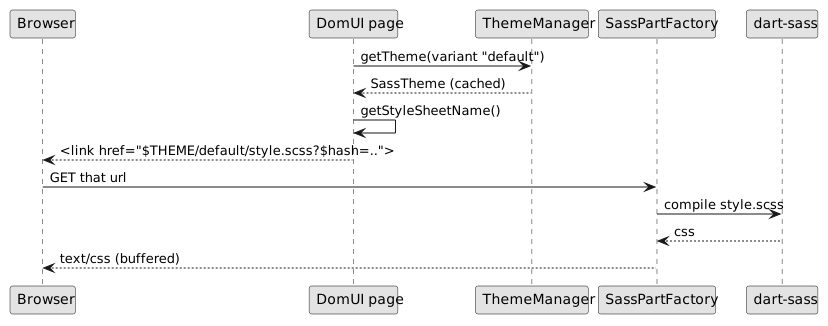
Every themed URL carries the variant as its first segment - $THEME/light-winter/...,
$THEME/dark-nord/... - so the scheme decides which file is served, and two schemes
never share a cache entry. A URL with a variant the application does not offer is served
from its default scheme.
Nothing is compiled ahead of time and nothing is written to disk. The page emits
a $THEME/-prefixed link whose query string carries a hash of the compiled
result, so the URL changes whenever the stylesheet does and the browser cache
never has to be reasoned about.
ThemeManager keeps the built ITheme objects in a map keyed by variant name.
It tracks the resources each was built from, so a changed file invalidates the
entry rather than being served stale.